

IT support refers to the technical assistance that keeps IT systems operational and secure. Let’s take a look at what makes for effective IT support and how to optimize your IT services with the right tools.
Key points:
- An N1/N2/N3 structure to effectively handle incidents at all levels.
- Direct impact on productivity, thanks to fewer breakdowns and proactive maintenance.
- Key roles in cybersecurity: patching, access control, and user awareness.
- Flexible model: in-house, outsourced, remote, or on-site, depending on your needs.
What is IT support?
Definition
IT support, also known as technical support or computer assistance, encompasses services designed to help users with the day-to-day use of their computer equipment and systems: workstations, software, networks, peripherals, etc.
He will speak on several occasions:
- as a precaution,
- for troubleshooting,
- during changes, such as a migration, for example.
💡Case Study: Find out how our teams handled a Windows server migration.
The Different Levels of IT Support (Level 1, Level 2, Level 3)
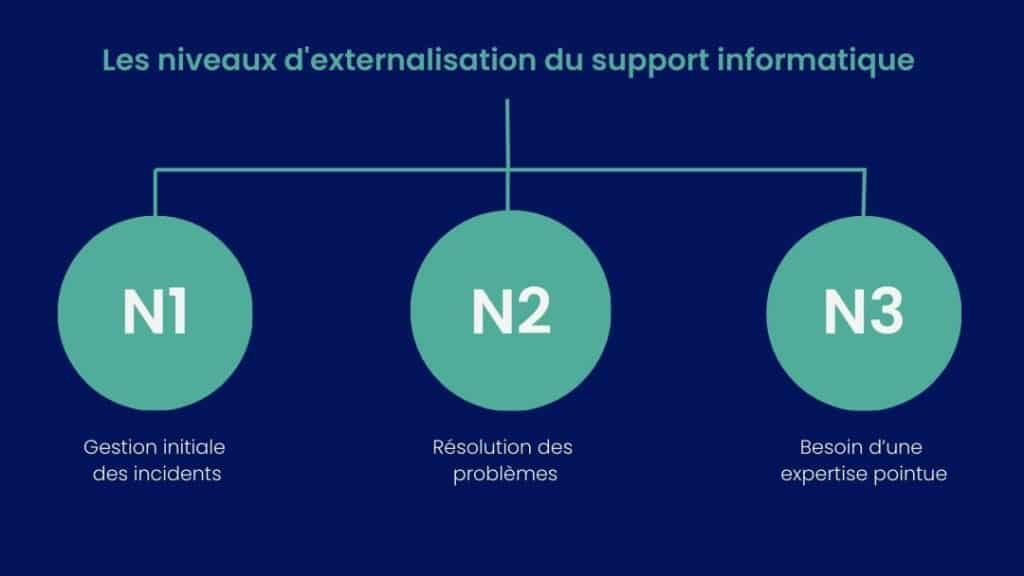
IT support is organized into several levels to ensure a smooth process based on the nature of the requests and their technical complexity:
- Level 1 (N1) Support: This is the level responsible for initial incident management and serves as the first point of contact for users. It handles common and simple issues, such as password requests, login problems, or basic system failures. N1 technicians follow standard procedures to resolve incidents quickly.
- Level 2 (N2) Support: If N1 cannot resolve an issue, it is escalated to Level 2. N2 technicians/engineers have more in-depth expertise and handle complex technical incidents that require more thorough analysis or specific configurations.
- Level 3 (N3) Support: the most specialized level, typically staffed by experts and engineers. N3 handles critical issues (Severity 1 incidents), software bugs, system failures, and anything that requires collaboration with multiple stakeholders.
Prioritization ensures smooth and efficient incident management, allowing issues to be prioritized and resolved as quickly as possible.
What services are included in IT support?
User Support
- Help with problems (computer, software, access).
- Password Reset.
- Support via phone, email, or chat.
- Support in using the tools.
Maintenance and Oversight
- Monitoring of servers and workstations.
- System and software updates.
- Performance verification.
- Failure Prevention.
Computer security
- Protection against viruses and cyberattacks.
- Antivirus and firewall management.
- Data backup.
- Access Management (who can see what).
Incident management
- Troubleshooting and bug fixes.
- Diagnosing the problem.
- Quick resolution or escalation (N2 / N3).
- Follow-up until the issue is fully resolved.
Hardware and Software Support
- Installation and configuration of workstations.
- Equipment troubleshooting (computers, printers, networks).
- Software installation.
- License Management.
What tools are used in IT support?
- Ticketing software to centralize, track, and prioritize user requests.
- Remote access tools for quick troubleshooting without having to travel.
- Tools for monitoring to monitor systems and detect problems early on.
👉 If you’re specifically interested in ticketing, we helped an aerospace company resolve an issue with scattered tickets.
Why is IT support essential for a business?
Reduce interruptions
Well-organized and efficient IT support plays a key role in reducing disruptions that can impact productivity and business operations. Through proactive system monitoring, it can detect and resolve issues before they affect users. Support teams and their collaboration, based on clear procedures and documentation, also help minimize downtime.
Regular maintenance, scheduled updates, and incident management also ensure a stable IT environment. IT support is proactive; it anticipates and prevents disruptions to ensure business continuity.
Securing Data
IT support plays a central role in protecting a company’ s data. It implements and maintains firewalls, antivirus software, regular updates and patching campaigns, and system access policies. In the event of a breach or attempted intrusion, IT support responds quickly to contain the threat, limit the impact, and collaborate with the lines of defense and CISOs.
It also plays a major role in raising user awareness of cybersecurity best practices (secure passwords, phishing emails, policies on desk and document organization, etc.). Through constant vigilance and rapid response, IT support helps ensure the security and confidentiality of sensitive information.
💡In 2026, cybersecurity isn’t just a concern for large companies—far from it; small and medium-sized businesses are increasingly affected. For example:
- The number of cyberattacks against Switzerland’s critical infrastructure is on the rise (ICTjournal).
- Hackers often target small and medium-sized businesses to carry out more attacks and increase their chances of success (Le Temps).
Optimize Costs
Fewer problems related to interruptions, outages, and data loss lead to lower costs. Through preventive maintenance, IT support minimizes costly emergency repairs and expensive equipment replacements.
In addition, effective management of incident tickets and knowledge base documentation improve efficiency and reduce the workload. IT support helps organizations make the right technology choices and ensure the long-term value of their investments by planning equipment management over several years, taking into account metrics such as performance and resource sharing.
💡In this customer case study, discover how Qim info—which was initially hired to provide Level 1 IT support for a major automotive group—ultimately led the complete modernization and securitization of its IT infrastructure.
The Different Types of IT Support
In-House vs. Outsourced IT Support
IT support can be managed in-house or outsourced to an external service provider, depending on the company’s needs and structure.
- In-house IT support: This is provided by a dedicated team within the company. This allows for a deeper understanding of the technical environment, immediate responsiveness, and direct contact with users. However, this entails higher fixed costs (salaries, training, tools) and limited capacity during peak periods.
- Outsourced IT support: This is entrusted to a specialized company that handles all or part of the support. This solution offers greater flexibility, access to a wide range of expertise, and sometimes the option of 24/7 coverage. It’s an excellent way to access specialists for temporary needs. It also helps control costs through flat-rate packages or on-demand contracts. On the other hand, it may involve longer response times and a reliance on a third party.
The decision between in-house and outsourcedIT support therefore depends on the company’s objectives, budget, and the complexity of its IT system. To help you make your decision, check out our article onoutsourcing IT support.
On-site vs. Remote Technical Support
Technical support can be provided on-site (with a technician present) or remotely (via remote access tools, phone calls, or messaging).
- Remote support: It is a fast, cost-effective, and efficient way to resolve most software or configuration issues. Accessible from anywhere, it allows for nearly immediate assistance, reducing wait times and travel costs.
- On-site support: This is essential for in-person tasks, such as replacing equipment, managing network cabling, or resolving hardware failures. It also provides direct human contact, which is helpful in certain complex situations or when assisting users.
💡Qim Info’s tip: In general, we recommend a hybrid approach. Remote support for common issues, and on-site support for cases that require a physical presence. This ensures efficiency, responsiveness, and cost control.
Proactive vs. Reactive Support
- Reactive support: This type of support is provided after a user reports a problem. It is the most common form of support, which involves resolving issues as they arise. Although essential, this approach can lead to disruptions if problems are not addressed quickly enough.
- Proactive support: It anticipates problems before they occur, using monitoring tools, regular audits, preventive updates, and continuous analysis of system performance. This approach aims to reduce risks and outages and optimize the reliability of the infrastructure.
Proactive support is becoming increasingly popular because it saves time, prevents costly disruptions, and ensures better business continuity.
How do you choose a good IT support service?
Essential Criteria
Choosing a good IT support service is essential to ensuring the performance and security of your IT infrastructure. Here are the key criteria to consider:
- Responsiveness and Availability: response times and service hours tailored to your needs (24/7, extended hours, business days, etc.). Good support must be able to respond quickly in the event of a critical incident (in accordance with specific SLAs based on the severity of the incident, to be specified).
- Technical expertise: Teams must have the necessary skills to manage the environment (workstations, networks, security, business software, etc.).
- Services offered: multichannel support (phone, email, chat, remote assistance), management of levels N1 through N3, and proactive options such as system monitoring.
- References and reputation: customer reviews, case studies, and recommendations can help assess a service provider’s reliability. In fact, Qim info has ranked third in the ICT Journal rankings for three consecutive years.
- Cost and flexibility of contracts: Compare the different options (flat-rate plans, per-incident billing, managed services) and tailor them to the company’s size and actual needs.
💡Check out our client case studies to see how Qim info:
- manages Dylitics’ IT infrastructure,
- Modernize the IT infrastructure of an international NGO.
Best Practices for Effective Collaboration
Clear and Ongoing Communication
Appropriate communication channels (tickets, email, chat) and the use of clear, understandable language to facilitate communication between support staff and users.
Shared Knowledge Base
Centralizing solutions and procedures enables faster incident resolution and promotes user autonomy.
Definitions of SLA
Clear response times based on ticket priority ensure efficient management of requests.
Collect user feedback
Feedback and surveys help improve service quality and better meet users’ needs.
Interdepartmental Collaboration
Effective coordination with other IT teams helps optimize the resolution of complex problems.
Continuing Education
Regularly updating the technical skills of the support team ensures that the service remains up-to-date and effective.
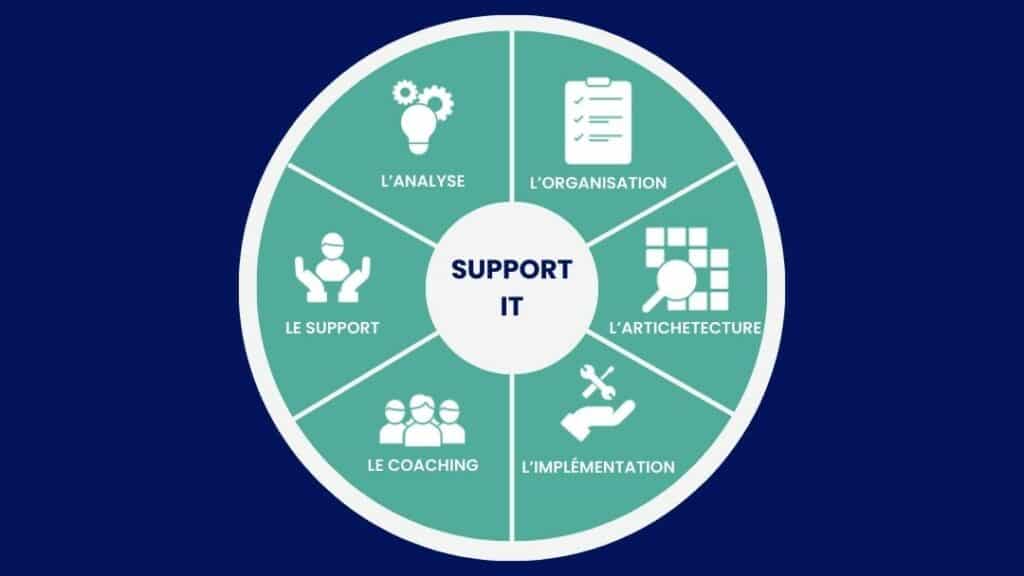
The Various Roles in IT Support
IT support plays a vital role in ensuring that a company’s IT systems run smoothly. This team can consist of several different roles, each with its own specific responsibilities and required skills.
Level 1 (N1) Support Technician
Handles simple issues and common requests using standard procedures.
Level 2 (N2) Support Technician/Engineer
Handles more complex incidents that require in-depth technical analysis.
Level 3 (N3) Support Expert/Engineer
Addresses critical and complex issues, often in collaboration with specialized teams.
Help Desk Analyst / Coordinator
Organizes ticket management and monitors deadlines and quality.
IT Support Manager
Manages teams, defines processes, and oversees overall performance.
💡Here are a few related careers:
How much does IT support cost?
The cost of outsourcing IT support depends on several key factors:
- System size and complexity: The more extensive and complex the IT infrastructure, the higher the support costs will be.
- Number of users: The more users your company has, the greater the support needs, which has a direct impact on costs.
- Required support levels: The price varies depending on whether only basic support (N1) is covered or whether advanced levels (N2 and N3) are also included.
- Type of service selected: Support can be partially or fully outsourced, with on-site or remote assistance, which affects the rate.
- Billing Options: Contracts can be based on a monthly flat fee, pay-as-you-go pricing, or flexible billing based on your needs.
- Availability hours: Support available 24 hours a day, 7 days a week will generally cost more than support limited to business hours.
Based on these factors, budgets can vary widely, ranging from a few hundred to several thousand francs per month, depending on the size of the company and the level of service expected.
How does IT support work with Qim info?
Whether you’re facing a lack of time, expertise, or resources for managing your computer equipment and IT infrastructure, Qim info provides a comprehensive solution that ensures your IT environment remains in optimal working order while keeping your costs under control.
For small and medium-sized businesses, we offer structured and scalable support designed to free you from IT constraints while boosting your teams’ productivity. Discover our IT solutions for small and medium-sized businesses.
FAQ
What is IT support?
IT support refers to all the people and departments that help users operate, maintain, and troubleshoot a company’s IT systems.
What is the role of IT support?
The role of IT support is to ensure that IT systems function properly and remain accessible to everyone.
👉 His role isn’t just to fix things, but also to anticipate problems.
What is an IT department?
The IT department is the team or division responsible for managing all of an organization’s computer systems.
IT support is part of the IT department: it is the function dedicated to assisting users and troubleshooting their issues.
What is the difference between a help desk and a service desk?
- The Helpdesk focuses on basic technical support → resolving issues and responding to user requests.
- The service desk goes a step further → it manages all IT services (support, requests, changes, and follow-up).
👉 In summary: the help desk handles troubleshooting, while the service desk organizes and manages IT support.