

Microsoft Purview centralizes data governance, protection, and compliance across your entire organization, whether your data is on-premises, in the cloud, or in a multi-cloud environment. It helps you regain control over sensitive data and reduce regulatory risks.
Key points:
- Complete visibility into where the data is, who has access to it, and how it is transferred.
- Significant reduction in the risk of noncompliance.
- Enhanced protection of sensitive data through labels, rules, encryption, and data leak prevention.
What is Microsoft Purview?
The Microsoft Purview Suite is a data governance and management platform that provides a unified view of data across the entire organization.
Launched by Microsoft to address the growing need for data governance, Purview helps companies discover, classify, and manage their data, while ensuring compliance with applicable regulations.
Designed for hybrid and multicloud environments, Purview enables you to govern not only data hosted in Azure, but also data in other clouds, on-premises, and in SaaS applications.
What is Microsoft Purview?
The main goal of Microsoft Purview is to simplify an organization’s data management by ensuring effective governance and reducing the risks associated with noncompliance.
By helping companies understand:
- where their data is located,
- who has access to it,
- and how they are used,
Purview plays a vital role in securing sensitive information.
It also provides tools to automate data classification, track data usage, and ensure that compliance policies are followed throughout the organization.
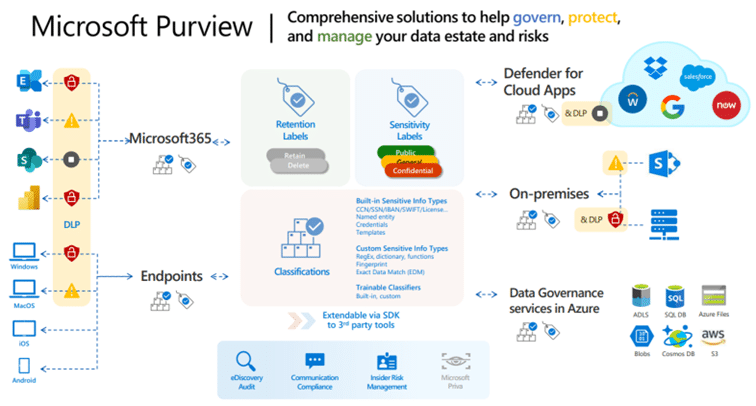
Key features of Microsoft Purview
Mapping your data
One of Microsoft Purview’s key features is its ability to map data. This means the tool can automatically scan data sources, regardless of where they are located (in the cloud or on-premises), and provide a comprehensive view of data assets.
This mapping provides a better understanding of the location of data, its flow, and how it is interconnected, thereby facilitating analysis and decision-making.
It is therefore an ideal tool for strengthening IT security in a company.
Managing risk and compliance
Purview helps identify data-related risks by providing compliance management tools.
It provides reports and analyses that enable organizations to ensure their data is managed in accordance with local and international regulations (such as the GDPR, LIPAD, etc.). In addition, Purview helps prevent data breaches by identifying sensitive data and enforcing appropriate protection policies.
Protecting sensitive data
Protecting sensitive data is important, especially in an environment where cyber threats are ever-present. Microsoft Purview uses advanced data classification and protection mechanisms, enabling organizations to define specific rules for managing sensitive information. This includes:
- encryption,
- access management,
- real-time data monitoring to detect and prevent any suspicious activity.
Integrating governance policies
Purview enables the integration of data governance policies at the organizational level by centralizing the creation, management, and enforcement of these policies. This includes access management, data classification, and the automatic enforcement of compliance rules.
By using Purview, companies can ensure that all data is managed according to the same governance standards, regardless of where it is stored.
The 4 benefits of Microsoft Purview
Better data visibility
Microsoft Purview provides unparalleled visibility into all enterprise data. This visibility not only helps you better understand where your data is located, but also who has access to it and how it is being used. This transparency facilitates decision-making and resource optimization.
Reducing the risk of non-compliance
With its compliance monitoring and management tools, Purview helps companies identify and mitigate risks related to noncompliance. By automating data classification and ensuring compliance with governance policies, Purview significantly reduces the risk of penalties for regulatory noncompliance.
Improving data security
By providing robust data protection mechanisms, such as encryption and access management, Purview significantly enhances the security of sensitive information. This enables companies to prevent data breaches and strengthen their overall security posture.
Optimising governance processes
Purview simplifies and centralizes the management of governance policies, enabling companies to optimize their data management processes. This centralization reduces administrative complexity and ensures consistent enforcement of rules across the entire organization.
How do I use Microsoft Purview?
Know your data: defining your corporate taxonomy
The first step toward using Microsoft Purview effectively is to fully understand your data.
It starts with creating a comprehensive map of your data sources, whether they are on-premises or in the cloud. This map helps you identify where your data is located, how it flows, and how it is interconnected.
Next, it is crucial to identify the different categories of data by establishing a taxonomy that reflects your company’s specific needs.
Finally, it is necessary to determine the level of confidentiality for each type of data, which makes it possible to classify information based on its sensitivity and to establish appropriate protection policies.
Protect your data: secure your data
Once you have a clear understanding of your data and have categorized it, the next step is to protect it.
To do this, you need to set up and configure Microsoft Purview to meet your organization’s specific needs. This includes configuring sensitivity labels, which automatically classify data based on its confidentiality level. These labels are essential for enforcing security policies that protect sensitive data from unauthorized access or inappropriate sharing.
Prevent data loss
Preventing data loss is a key aspect of data governance with Microsoft Purview.
Once data has been classified and protected, Purview allows you to implement policies that prevent the inappropriate sharing of sensitive information. This includes measures to prevent sensitive data from being sent via email, shared through unsecured platforms, or downloaded to unapproved devices.
These mechanisms help minimize the risk of data leaks and ensure that critical information remains protected within the organization.
Govern your data
Data governance with Microsoft Purview involves the automated management of the data lifecycle.
This means you can set rules to retain, delete, or archive data based on its sensitivity, age, or relevance to the business.
By automating these processes, Purview helps ensure that data is managed in accordance with internal policies and external regulations, while optimizing the use of storage resources and reducing the risks associated with outdated or non-compliant data.
Comparison with other data governance solutions
Microsoft Purview vs. AWS Data Lake Governance
Microsoft Purview and AWS Data Lake Governance are two data governance solutions designed for different environments.
Purview stands out for its native integration with the Microsoft ecosystem, offering a more seamless experience for organizations that have already invested in Azure and Microsoft 365.
On the other hand, AWS Data Lake Governance may be more beneficial for companies with a predominantly AWS environment.
Microsoft Purview vs. Google Cloud Data Catalog
Compared to Google Cloud Data Catalog, Microsoft Purview offers a more comprehensive data governance solution, including advanced capabilities for risk management and compliance.
Google Cloud Data Catalog, while powerful for data discovery and classification, lacks some of the monitoring and policy management capabilities that Purview offers.
How can I integrate Microsoft Purview with other Microsoft tools?

Integration with Azure
Microsoft Purview integrates seamlessly with Azure, providing extensive governance capabilities for data hosted on Microsoft’s cloud platform. This integration enables unified data management in Azure, with enhanced security and compliance features.

Integration with Microsoft 365
Purview’s integration with Microsoft 365 enables you to govern and protect sensitive data stored in collaboration tools such as SharePoint, OneDrive, and Teams. This ensures that governance policies are consistently enforced across all collaboration platforms.

Integration with Power BI
Purview also integrates with Power BI to ensure governance of the data used in reports and dashboards. This integration makes it possible to trace the origin of the data, ensure its quality, and protect sensitive information, while facilitating compliance with applicable regulations.
Qim info will support you with Microsoft Purview
At Qim info, we understand the importance of effective and secure data governance. That’s why we provide you with a team of experts certified in several key areas, including Microsoft cybersecurity architecture.
Our specialists have extensive experience implementing data governance solutions and can support you every step of the way, from defining your strategy to configuring Microsoft Purview.
Thanks to this expertise, we are able to offer you the best possible options to meet your specific needs, whether it’s mapping your data, protecting sensitive information, or ensuring compliance with applicable regulations. By working with us, you’ll benefit from tailored support designed to maximize the value of your data while minimizing risks.
How do I use Microsoft Purview?
- Step 1: Initial configuration, including integration with the company’s various data sources. It is essential to clearly define governance and compliance objectives at this stage in order to make the most of the features offered by Purview.
- Step 2: Navigate the user interface, which is designed to be intuitive and accessible, even for non-technical users.
- Step 3: Create governance policies. These policies define the rules for managing data within the organization. It is possible to create specific policies for different categories of data, depending on their sensitivity or intended use.
- Step 4: Monitor compliance with the rules in real time. Detailed reports can be generated to analyze compliance and identify areas of risk, thereby facilitating informed decision-making.
FAQs
How much does Microsoft Purview cost?
Microsoft Purview is primarily billed on a pay-as-you-go basis based on the features enabled. The cost depends mainly on usage:
- number of protected files, tables, or resources;
- number of queries analyzed;
volume of user logs processed; - storage and computing power used;
- Number of Microsoft 365 files classified on demand.
You can find more details on the relevant Microsoft pages here or there.
How do I activate Purview?
Microsoft Purview isn’t something you can just turn on with the click of a button. Instead, we talk about “deploying”or “configuring” Microsoft Purview solutions.
Certain specific features can then be enabled, such as auditing, automatic tagging, or certain Premium features.
First, we verify the licenses and administrator rights, then we select the solutions to configure: audit, DLP, labeling, risk management, data protection, etc.
Microsoft provides configuration guides to help you through the deployment step by step.
What is Microsoft's EDR solution?
Microsoft’s EDR solution is called Microsoft Defender for Endpoint. EDR stands for “Endpoint Detection and Response”: it is a solution that monitors workstations, servers, and devices to detect suspicious behavior, investigate attacks, and respond quickly.