
SonarQube is an essential tool for analyzing the quality and security of source code.
Key points:
- SonarQube performs a static code analysis to detect bugs, vulnerabilities, and coding best practices.
- The tool integrates easily into CI/CD pipelines for continuous monitoring.
- Safety rules and Quality Gates can be customized to meet the project’s needs.
What is SonarQube?
Definition and Role
SonarQube is a static code analysis (SAST) platform that helps development teams detect vulnerabilities, bugs, and quality issues before code is deployed to production.
➡️ What it does: SonarQube directly analyzes the source code to identify security risks such as SQL injections, XSS vulnerabilities, or other development errors that could be exploited by an attacker.
In addition to detecting vulnerabilities, the solution centralizes scan results in a single interface. Teams can:
- track issues,
- prioritize them based on their level of criticality,
- assign them to the developers
- manage their correction over time.
➡️ What it actually does: Integrated into CI/CD pipelines and DevSecOps practices, SonarQube enables organizations to address security issues early in the development process and improve code quality.
Does SonarQube support SAST, SCA, and DAST?
SonarQube is first and foremost a SAST platform. Its role is to analyze source code. Other approaches address complementary issues:
- SCA (Software Composition Analysis) examines the dependencies and open-source components used by the application to identify known vulnerabilities (CVE).
- DAST (Dynamic Application Security Testing) tests a running application to detect exploitable vulnerabilities in its actual behavior.
These approaches are complementary: SAST analyzes the code developed by the teams, SCA examines third-party libraries, and DAST evaluates the application once it has been deployed.
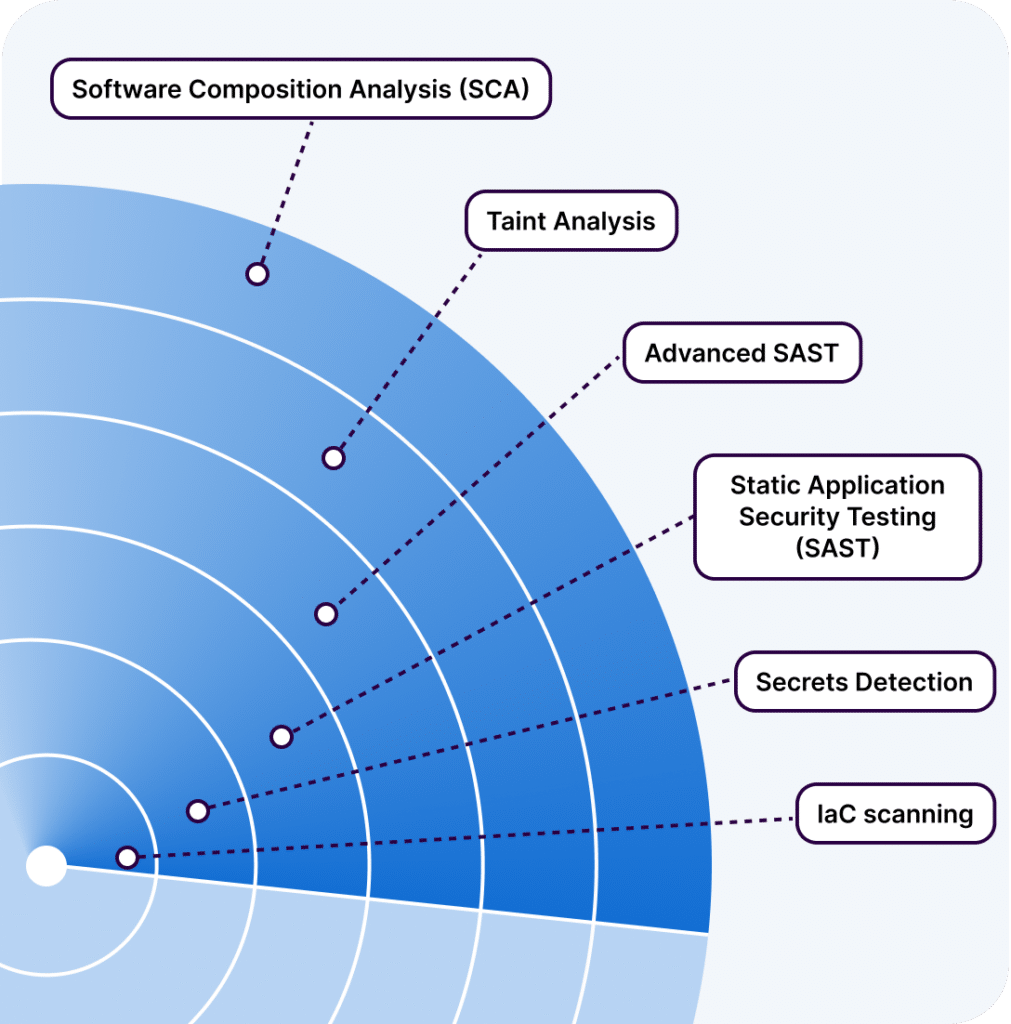
To address this need, SonarSource has introduced SonarQube Advanced Security, which expands the platform’s capabilities with Software Composition Analysis (SCA) and advanced security analysis features.
What is SonarQube Advanced Security?
SonarQube Advanced Security is an enterprise-level extension of the SonarQube integrated platform.
In an application, a significant portion of the risk also stems from open-source dependencies and interactions with third-party libraries. This is precisely the problem that SonarQube Advanced Security aims to solve with two major features:
- Software Composition Analysis (SCA) to identify known vulnerabilities (CVEs), malicious packages, and certain risks related to open-source licenses;
- Advanced SAST to take security analysis a step further by tracking data flows beyond just the business logic.
Specifically, SonarQube is also capableof assessing the risks introduced by third-party libraries and components used by the application.
💡 One of the most interesting features is the detection of so-called cross-boundary vulnerabilities. Some vulnerabilities do not appear in your code or in a library on its own, but rather in the interaction between the two. Thanks to advanced flow analysis, SonarQube Advanced Security can highlight this type of complex scenario, which is often difficult to detect using traditional approaches.
How does SonarQube analyze code security?
How does static security analysis work?
Step 1: Source code analysis. When an analysis is launched, SonarQube scans the project’s source code and applies a set of security rules tailored to the language being used (Java, C#, JavaScript, Python, etc.).
Step 2: Detection of risky patterns. The analysis engine searches for code patterns known to be associated with vulnerabilities or unsafe practices.
Step 3. Assigning a severity level . Each detected issue is classified based on its nature and severity to help teams prioritize fixes.
Step 4: Reporting Results. The results are then consolidated in the SonarQube interface, where developers can analyze the alerts, understand their source, and track their resolution.
💡Feel free to check out our article on clean code. You might also be interested in our article on digital sovereignty.
Examples of vulnerabilities detected by SonarQube
Some of the main security issues that SonarQube can identify include:
- Injections (SQL, OS, LDAP, etc.): User-supplied data is used without sufficient validation or protection, opening the door to command or query injections.
- Cross-Site Scripting (XSS) vulnerabilities: situations in which untrusted data is sent back to a browser without an appropriate protection mechanism, increasing the risk of XSS attacks.
- Exposure of sensitive data: hard-coded passwords, API keys, credentials embedded in the code, or outdated cryptographic practices.
- Risky authentication practices, such as storing passwords directly in the code.
- The dangerous uses of certain APIs or development mechanisms, particularly those involving deserialization or the manipulation of unreliable data.
💡 SonarQube distinguishes between two types of security reports:
- Vulnerabilities are security flaws identified in the code that must be fixed because they pose a proven risk.
- Security Hotspots flag sensitive portions of code that require human review to determine whether a real risk exists.
SonarQube Security Rules
Security Rules form the foundation of SonarQube’s detection capabilities. They enable the tool to automatically identify vulnerabilities, risky behaviors, and development practices that do not comply with security standards.
These rules are generally linked to recognized standards such as:
- OWASP Top 10,
- CWE Top 25,
- OWASP ASVS,
- PCI DSS,
- CERT Secure Coding…
This mapping allows us to link detected vulnerabilities to risk categories that are widely used in the industry. The following are the main reference frameworks taken into account:
- OWASP Top 10 (Open Web Application Security Project) is an international open-source community dedicated to improving web application security. It publishes a list of the top ten web security risks.
SonarQube includes numerous security rules related to the risks described in the OWASP Top 10, particularly regarding injections, the handling of sensitive data, and authentication mechanisms.
- CWE Top 25 (Common Weakness Enumeration), a standardized catalog of software weaknesses (bugs, design flaws) that can lead to exploitable vulnerabilities.
It lists common security vulnerabilities, and its annual Top 25 highlights the most critical ones. SonarQube maps its rules to these CWEs.
Each rule often specifies its connection to a standard, thereby helping developers understand the severity of the vulnerability while raising their awareness of best practices.
SonarQube for IDE
This free extension acts as a real-time safety net.
Its true value becomes apparent in Connected Mode: the IDE connects to SonarQube Server or SonarQube Cloud and applies the same rules as the project: Quality Profile, exclusions, analysis settings, and the statuses of issues that have already been accepted or marked as false positives. The developer works with the same requirements as those used in the centralized analysis.
💡 Not all vulnerabilities can be detected solely through local analysis in the IDE. More complex vulnerabilities require a comprehensive analysis on the SonarQube Server or SonarQube Cloud.
Simply put, SonarQube for IDE does not replace centralized analysis; it brings it closer to the developer.

Security Best Practices with Sonarqube
Shift Left Security
Shift Left Security is the concept of moving security checks as early as possible in the development cycle. Instead of discovering vulnerabilities at the end (during an audit, a penetration test, or just before deployment), the goal is to identify them as soon as the code is written, and then at every stage of the delivery process.
In line with this approach, SonarQube operates on several levels:
- In the IDE, with SonarQube for IDE: developers receive alerts as they write their code. This is as “early” as it gets: the issue is detected even before the commit.
- In the pull request or merge request : SonarQube can analyze the modified code before it is integrated. The team can then block or fix a vulnerability before it enters the main branch.
- In the CI/CD pipeline: analysis becomes an automated check. Quality Gates can prevent the delivery of code that does not meet defined criteria, such as when new critical vulnerabilities are detected.
- In project monitoring: SonarQube centralizes issues, security hotspots, severity levels, accepted false positives, and changes in technical or security debt over time.
Customize Quality Gates and Quality Profiles
We need to define which rules to apply and at what threshold code becomes unacceptable. That is exactly the purpose of Quality Profiles and Quality Gates.
The Quality Profile determines the rules used during the analysis. Each language has a default profile, such as “Sonar Way,” but this profile can be adapted to the project’s context. From a security perspective, a good profile should reflect the project’s actual risk level. Rules related to injection vulnerabilities, exposure of secrets, weak cryptographic practices, or security hotspots must be carefully selected and then documented whenever an exception is made.
The Quality Gate, on the other hand, plays a different role: it turns these analyses into a decision. The code passes or fails based on predefined conditions.
Example: An organization may decide that no new critical vulnerabilities should be introduced, that all new security hotspots must be reviewed, or that the level of test duplication and coverage must remain within acceptable thresholds.
Best practice is to start with the new code. Rather than trying to fix all the legacy debt at once, the first step is to prevent new vulnerabilities from being introduced. Then, teams can gradually address existing issues without bringing the entire project to a sudden halt.
Finally, false positives and accepted risks must remain within established limits. An alert may be dismissed after review, but this decision must be documented. This is what allows us to maintain a healthy balance: strict enough to prevent abuses, yet pragmatic enough to remain compatible with the realities of projects.
Automating Analysis in a CI/CD Pipeline
For better integration into processes, SonarQube can be integrated into CI/CD pipelines.
The goal is to automate code analysis within pipelines. Here are a few examples of integration:
Integration with GitLab CI
GitLab CI allows you to orchestrate analysis jobs. Simply add a job to the “.gitlab-ci.yml” file to run the analysis using SonarScanner. This job will use the GitLab project variables to access the Sonar server (URL, token).
An example configuration:
"sonar_scan:

  stage: analysis

  image: sonarsource/sonar-scanner-cli:latest

  script:

- sonar-scanner -Dsonar.projectKey=myproj -Dsonar.host.url=https://sonar.exemple.com -Dsonar.login=$SONAR_TOKEN

  only:

- merge_requests

- main

"Result: Every merge request or commit to the main branch triggers a scan. GitLab can also stop the pipeline if the Quality Gate is not passed.
Integration with Jenkins
Jenkins has a SonarQube plugin that makes it easy to run the scan. You configure the Sonar server information in Jenkins (in the global configuration), and then in the pipeline (Jenkinsfile pipeline or freestyle job), you add a Sonar step.
An example of a declarative script:
"stage('SonarQube Analysis') {
  steps {
withSonarQubeEnv('My Sonar') {
  sh 'sonar-scanner -Dsonar.projectKey=myproj -Dsonar.sources=src/ -Dsonar.host.url=https://sonar.exemple.com -Dsonar.login=${SONAR_TOKEN}'
}
  }
}"
The Jenkins Sonar plugin also provides a step to wait for the Quality Gate comparison (waitForQualityGate) in order to stop the pipeline if the criteria are not met.
Integration with GitHub Actions
On GitHub, you can either use the official “SonarSource/sonarcloud-github-action” (primarily for SonarCloud) or call the scanner directly in a job.
An example of a workflow:
"- name: SonarQube Scan
  uses: sonarsource/sonarqube-scan-action@v1.2
  with:
host_url: ${{ secrets.SONAR_HOST_URL }}
login: ${{ secrets.SONAR_TOKEN }}
projectBaseDir: "./"
"
Other CI/CD Tools
SonarQube integrates with other systems such as Azure DevOps (via an extension), Bitbucket Pipelines, CircleCI, and others. In a DevSecOps approach, the pipeline acts as a safeguard: deployments to production are blocked if security criteria are not met.
IDE Integration (SonarLint)
For even earlier integration into the development cycle, you can use SonarLint within your IDE. SonarLint is a plugin (available for IntelliJ, VS Code, Eclipse, etc.) that analyzes code as it is being written and alerts developers to vulnerabilities while they are developing, allowing them to fix those vulnerabilities before committing changes.
By automating SonarQube in CI/CD, we embed security at the heart of development. Teams receive rapid feedback, make corrections, and adopt security as an essential criterion for every release.
Interpreting Reports Correctly
Receiving security alerts via SonarQube is useful, but interpreting and responding to them is even more so.
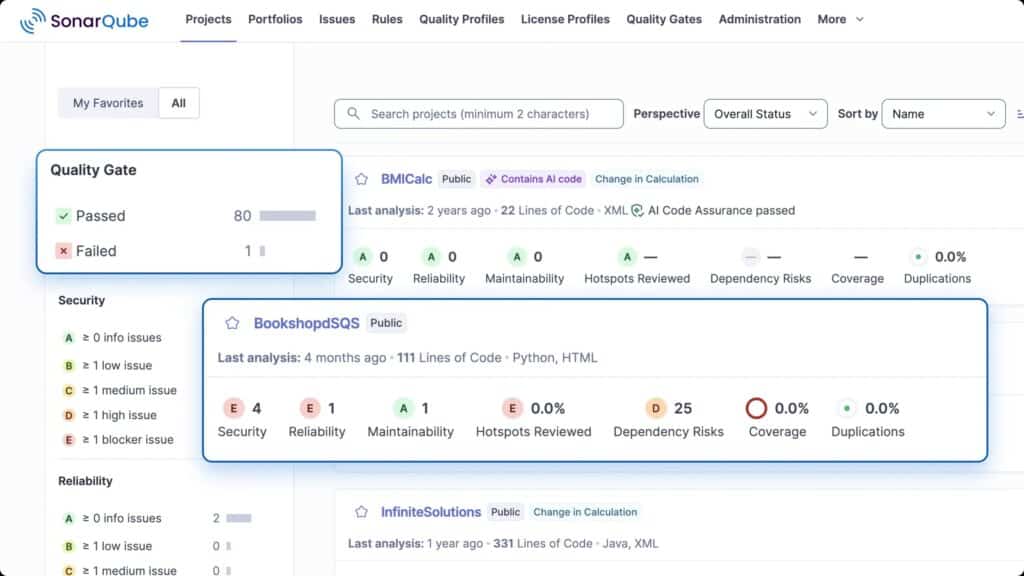
The tool provides an overview and detailed information to help with this task. The dashboard displays a Security Score (A through E), the number of open vulnerabilities, and “Security Hotspots” to check.
An “E” indicates serious problems. This quick overview provides an initial assessment of the project’s overall status.
The Issues list contains the details needed for analysis and resolution: title, severity, rule violated, and its location in the source code.
There is also an explanation of the risk and the solution. This advice is often accompanied by best practices or documentation.
The next step is to determine the action plan: quickly fix critical vulnerabilities and schedule fixes for minor ones, without letting them pile up over time.
With regard to “Security Hotspots,” a review step is necessary: assign their verification to the team and then decide whether or not they need to be corrected (false positive or accepted risk).
In short, making effective use of SonarQube Security means incorporating these reports into day-to-day operations and overall project management.
Integrate the tool into a DevSecOps approach
To maximize SonarQube’s effectiveness, it should be viewed not as a standalone tool but as a building block of the “DevSecOps” culture. Here are a few tips:
- Integrate SonarQube into processes from the earliest stages of development. Making it an acceptance criterion establishes security as a quality criterion.
- Raise awareness among the team: A developer who understands why a vulnerability is a problem will naturally write more secure code.
- Integrating SonarQube into workflows: by automating analyses in CI/CD pipelines, integrating report results into project management, and managing vulnerabilities via tickets.
- Supplement with other tools: To learn more about DevSecOps tools, we have a dedicated article.
SonarQube’s Limitations Regarding Application Security
SonarQube alone does not cover all aspects of application security.
Its first limitation stems from its static approach. As a result, it can identify visible vulnerabilities in the code, but it does not test the application’s actual behavior when it is running.
Second limitation: The analysis depends on the rules that are available, enabled, and tailored to the language being used. It cannot guarantee the absence of vulnerabilities. Like any SAST tool, it may generate false positives, but it may also miss certain cases that are more complex or too dependent on the application context.
Third limitation: SonarQube does not analyze a system’s entire security surface. It does not replace a DAST tool for testing a deployed application, nor a SCA tool dedicated to dependency analysis, nor infrastructure, cloud, container, or server security solutions. Nor does it replace an architecture review or a penetration test when the risk level warrants it.
Comparison with Other Security Tools
There are various tools that address needs similar to those covered by SonarQube, each with its own unique features:
Checkmarx
Checkmarx offers more features than SonarQube. The platform integrates SAST, DAST, SCA, container security, andIaC security.
Veracode
Veracode offers SAST, DAST, and dependency analysis. You submit your code to it, and it returns a detailed vulnerability report—ideal for compliance and audits.
Snyk
Snyk is a versatile tool that provides SAST, SCA, container security, and IaC security.
How does Qim info help you implement security with SonarQube?
At Qim info, we support you every step of the way as you integrate SonarQube Security to turn application security into a driver of performance. Through our personalized approach, we train you on security challenges, how to use the tool, and how to seamlessly integrate it into your CI/CD pipelines. We also provide regular follow-up to help you interpret reports, adjust rules, and connect SonarQube to other security solutions.
Our support consists of three components:
- Consulting and Training: Analysis of your needs and hands-on training in the tool.
- Technical implementation: deploying the server or SonarCloud, configuring profiles and quality gates, and integrating them into your CI/CD pipelines.
- Monitoring and Progress: assistance with report analysis, ongoing adjustments, and synergies with other security tools, including container image scanners.
Drawing on our expertise in DevOps and security, we help you integrate SonarQube into your practices for the long term. The result: more autonomous teams, more robust code, and better-protected projects.
Our teams at the Center of Expertise share a common knowledge base. They benefit from cross-functional skill development, ensuring their ability to keep pace with all the latest developments. Choose collective excellence to secure, optimize, and evolve your IT environment with confidence.
FAQ
Can SonarQube be integrated with a DAST or IAST tool?
It is entirely possible to use SonarQube alongside a DAST or IAST:
- Parallel execution in CI: A dynamic analysis can also be launched within the pipeline. If either method detects a critical vulnerability, the pipeline can be blocked.
- Report consolidation and centralization: To provide a comprehensive overview, third-party tools such as “DefectDojo” allow you to import results from SonarQube and a DAST tool, offering a clear summary. Code repositories such as GitLab and GitHub also provide security dashboards.
- Synergy: SonarQube and DAST/IAST are not mutually exclusive; they complement each other: their combination enhances vulnerability detection.
In short, integrating SonarQube with dynamic analysis tools broadens security coverage. Coordination is driven by processes—such as pipelines and unified reports—rather than by SonarQube alone.
How do I install and configure Sonarqube?
- Step 1: Check the server prerequisites: Java, RAM, disk space, database, and system settings—especially on Linux; download the version that suits your needs here .
- Step 2: SonarQube can be self-hosted using SonarQube Server. Teams that want to minimize infrastructure management can also opt for SonarQube Cloud, SonarSource’s SaaS offering.
- Step 3: Create a project corresponding to the code to be analyzed, then generate an analysis token.
- Step 4: Run the analysis using SonarScanner, which sends the results to the SonarQube server, where they can be viewed as issues, Security Hotspots, quality metrics, and dashboards.
What is a vulnerability in SonarQube?
This is a security vulnerability identified in the source code by a scanning rule. It indicates that a particular behavior of the code may expose the application to a risk.
Each vulnerability is reported asan issue, with
- a location in the code,
- an explanation of the problem,
- a severity level
- recommendations intended to guide the correction.
However, it is important to distinguish between vulnerabilities and security hotspots. A vulnerability is an issue that SonarQube considers to be a flaw that needs to be fixed. A security hotspot, on the other hand, flags a sensitive section of code that must be reviewed manually before concluding that a risk actually exists.
What are the main products offered by SonarSource, and how do they meet the needs of a small development team?
SonarSource currently offers three main versions of SonarQube:
- SonarQube for IDE,
- SonarQube Cloud,
- SonarQube Server.
For a small development team, the combination of SonarQube for IDE and SonarQube Cloud is particularly useful: issues are detected as soon as the code is written and then automatically checked before merging.