

This article shows how to select the best DevSecOps toolsor the best DevSecOps toolstools to integratea security allt throughout the development cycle, without slowing down delivery. The real value comes not from a single tool, but from a DevSecOps stack aligned with the maturity of the teams.
To remember:
- Above all, DevSecOps reduces detection and correction times, with a direct impact on costs.
- The best DevSecOps tools are complementary, not interchangeable.
- Smooth integration into IDEs and CI/CD pipelines is more critical than functional richness.
- Human adoption (progressiveness, training) is the key success factor.
Take Back Control of Your Cloud
Why integrate security into the DevOps pipeline?
Before getting to the heart of the matter, a quick reminder about DevSecOps.
The DevSecOps approach aims to strengthen security by including it at every stage of the software development development lifecycle, directly within DevOps pipelines and pipelines. CI/CD.
This is an evolution of DevOps which brings many advantages:
- reduce the number of vulnerabilities,
- reduce their detection time,
- reduce remediation time,
- better control costs,
- better control of project progress.
What is a DevSecOps tool and what is it used for?
A DevSecOps tool is a device or means of facilitating the implementation of the DevSecOps approach. These tools can be software or platforms. They are made available to development, security and operations teams so that they can increase their efficiency and improve the integration of security throughout projects.
All of these actions can be performed using one or more tools. Don’t worry! All of the acronyms are explained in further detail below.
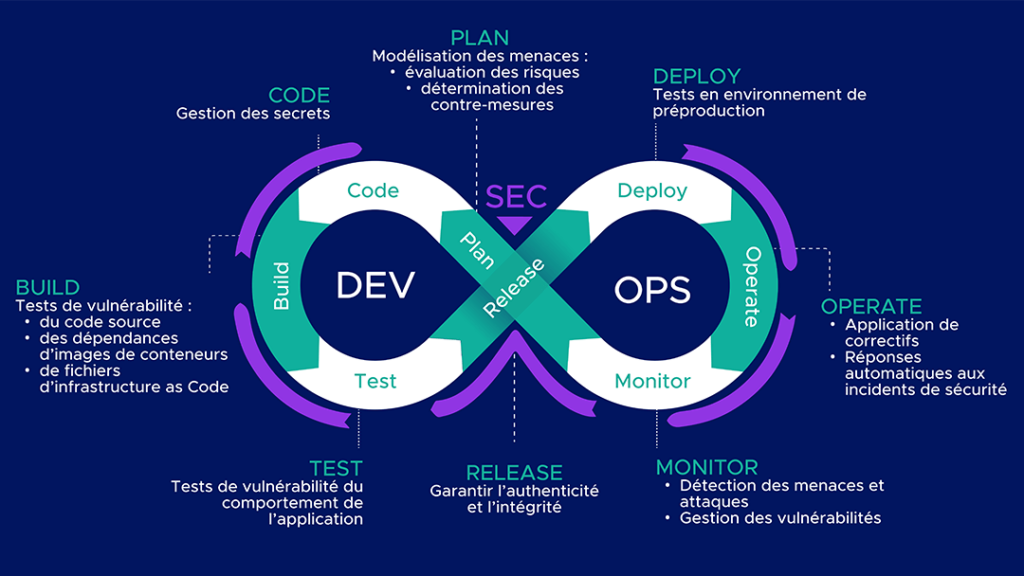
What are the main categories of DevSecOps tools?
SAST tools for static application security testing
SAST (Static Application Security Testing) tools enable you to identify vulnerabilities in source code. These tests are carried out without running the application.
➡️Des errors such as hard-coded secrets or weak encryption algorithms are highlighted. The results of these tests provide the precise locations (files and lines) of potential vulnerabilities.
DAST tools for dynamic application security testing
DAST (Dynamic Application Security Testing) enables you to analyze application behavior during operation. To do this, requests are sent to the application, and the responses are examined for vulnerabilities.
➡️Des vulnerabilities such as Cross-Site Scripting (XSS) and SQL Injection can be detected, but their sources are not precisely identified.
💡Qim info tip: DASTs are usually performed after SASTs, as they require a working application.
IAST tools for interactive application security testing
IASTs (Interactive Application Security Testing) are hybrid hybrid tests between SAST and DAST. They work through agents in the application’s runtime environment, which analyze security problems as they occur.
➡️Ils detect vulnerabilities similar to those detected by DAST and are able to return the location of the vulnerability in the source code, just like SAST.
💡Their effectiveness is highly dependent on the technologies used (languages, frameworks, runtimes) as well as the coverage of the tests run. Portions of the application that are not called upon during analysis may not be inspected.
SCA tools for software composition analysis
SCA (Software Composition Analysis) tools analyze third-party third-party components in the code such as direct and indirect dependencies. They can be used to obtain information on both licenses to manage compliance, and identify components with vulnerabilities.
💡Some SCA tools generate files called SBOM (Software Bill of Material) which list all third-party and open source components integrated into the code to enable their traceability.
Kubernetes container and image scanning tools
A container is created from an image, made up of several layers including the base image. It is therefore important to ensure that it comes from a reliable registry and check for vulnerabilities.
For this purpose, scanners are available to identify vulnerabilities in images, and to provide suggestions for image versions containing fewer vulnerabilities.
💡You can read HERE our article on IT containerization.
IaC file scanning tools
Security tools Infrastructure as Code (IaC) tools analyze Terraform, Kubernetes, CloudFormation or Ansible configuration files to detect security errors before infrastructure deployment.
Integrated into CI/CD pipelines, these tools automate security checks right from the development phase, and limit the risks associated with cloud misconfigurations.
➡️Ils can be used to identify permissions IAM permissions, publicly exposed ports, misconfigured cloud resources or secrets in configuration files.
SIEM and XDR tools for threat detection and monitoring
- A SIEM (Security Information and Event Management) collects and aggregates data from various event logs. These elements are then correlated so that suspicious activities and threats can be identified and prioritised. Alerts are issued once they are detected, thereby reducing the Mean Time To Detection (MTTD). A SIEM also generates numerous dashboards to provide an overview of system activity.
- An XDR (Extended Detection & Response) solution is a multi-layer multi-layer monitoring from endpoints to firewalls, servers and cloud workloads. It collects and analyses data, which it uses to detect and respond to threats.
SOAR tools to automate incident response
The main purpose of a SOAR (Security Orchestration, Automation and Response) solution is to detect and block attacks. To this end, it has a number of functions:
- tool orchestration,
- task automation with playbooks that trigger automated responses.
💡This platform enables centralized management of security incidents, and can be fed with data from a SIEM.
How do you choose a DevSecOps tool?
The choice of a DevSecOps tool depends above all on three criteria:
- Integration into CI/CD pipelines. A DevSecOps tool must be able to integrate easily with existing workflows: GitHub Actions, GitLab CI/CD, Jenkins, Azure DevOps or Kubernetes. The quality of integrations and APIs directly influences the automation of security controls and adoption by DevOps teams.
- The type of risks to detect. As we have seen, not all DevSecOps tools serve the same purpose. It is therefore essential to identify the most critical areas of the application pipeline.
- The organization’s level of maturity. Some solutions are suited to small technical teams looking for simple-to-deploy tools, while others meet large-scale governance, compliance or multi-environment monitoring needs. Cloud-native and Kubernetes projects also require specific functionalities linked to containers, workloads and infrastructure as code.
Top 7 DevSecOps tools
1. DefectDojo for managing vulnerabilities
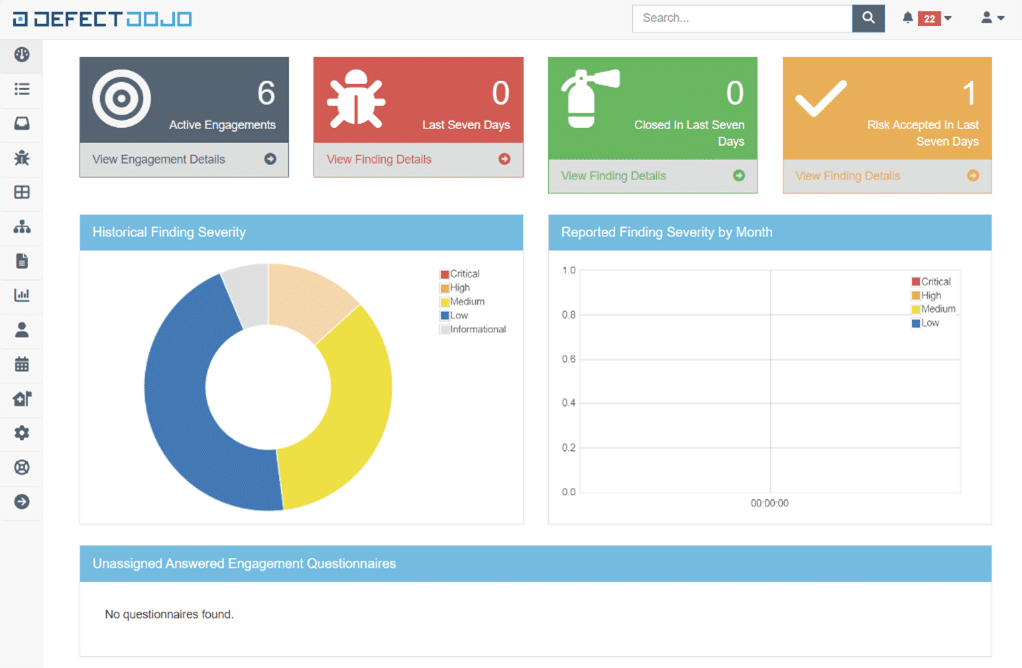
DefectDojo is a platform that aggregates reports from different security tools to centralize their vulnerabilities.
It can be self-hosted or available as SaaS. For the purposes of this comparison, we tested the demo platform available online.
Who is it aimed at?
Companies wishing to secure their systems on a large scale and who are ready to hire a DefectDojo manager.
Pros
- Centralise vulnerabilities and the management thereof: allows you to list and manage all vulnerabilities from different tests on different products.
- Customisable dashboards to track security progress.
- Integration possibilities: many well-known SAST, DAST and infrastructure scanning tools, such as Checkmarx, SonarQube and Trivy.
- Its API for providing test reports to DefectDojo and obtaining information from outside the platform.
Cons
- A steep learning curve. The platform offers a wealth of information and configuration options. Getting the hang of it will take time and so it needs to be a gradual approach to avoid discouraging new users. Integrate products gradually, starting with the most critical.
- The price of Dojo Pro.
2. Snyk for securing open source dependencies
Snyk offers several products:
- Snyk Code (SAST)
- Snyk Open Source (SCA)
- Snyk Container
- Snyk Infrastructure as Code
- Synk App Risk ASPM
Snyk integrates not only with CI/CD pipelines, but also with IDEs and container registries.
As part of this comparison, we tested the free version of Snyk with its Web application and VS Code extension.
Who’s it for? Companies looking for a multi-disciplinary tool with existing security skills.
Pros
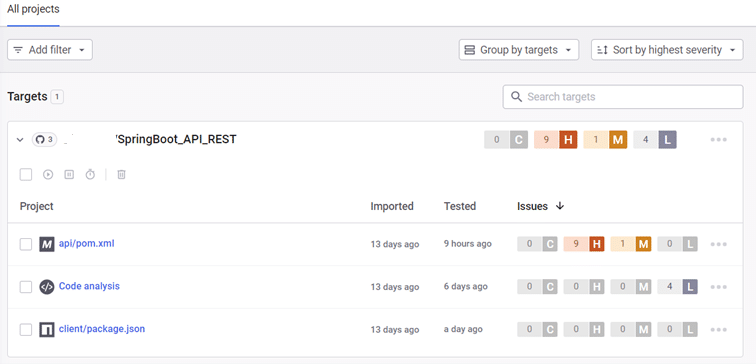
- Ease of integration in an IDE: easy to install, user-friendly, ability to choose test modules and the severity level of vulnerabilities to be displayed.
- The Web application: to get an overview of projects, open pull requests in Github, or manage the organisation and its members.
Cons
- Suggestions for remediation. In our tests, many of them were missing or included examples that had nothing to do with the code that was analysed. This can be frustrating and time-consuming for developers.
- Analysis time. In the IDE, it is impossible to target the files to be analysed. For large-scale projects, this means a lengthy analysis process that slows down developers.
3. SonarQube for static code analysis
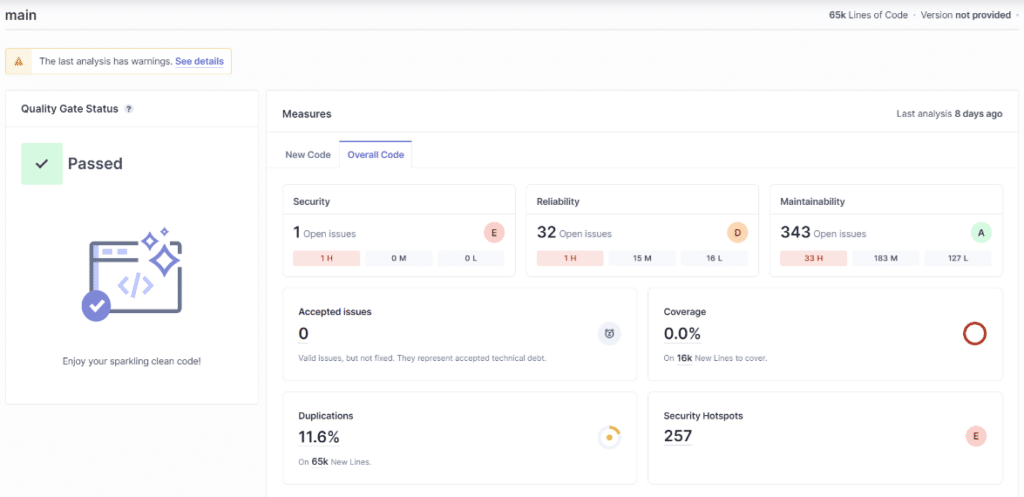
SonarQube is a code quality tool that performs static tests (SAST) for multiple languages.
It can be integrated into CI/CD pipelines.
For the purposes of this comparison, we have tested the Community version of SonarQube.
Who is it aimed at? Companies who have no security expertise but who still want to improve the security levels of their projects.
Pros
- The graphical interface. It’s easy to understand, despite its many criteria and configurations.
- Problem management. You can assign them to people, manage their lifecycle (accepted, false positive, confirmed, repaired), and assign custom tags.
- Quality Gates. They help define a minimum level of quality for projects. Test results are compared with predefined criteria, to validate or reject the project.
- Specific suggestions for remedial action, adapted to the project.
Cons
- The price. It varies depending on the version and the number of lines of code to be analysed and can be very high.
- Integration can be tricky, due to incorrect instructions in the documentation and unclear error messages.
4. Trivy for vulnerability scanning
Trivy is a vulnerability scanner for Infrastructure as Code containers and configuration files.
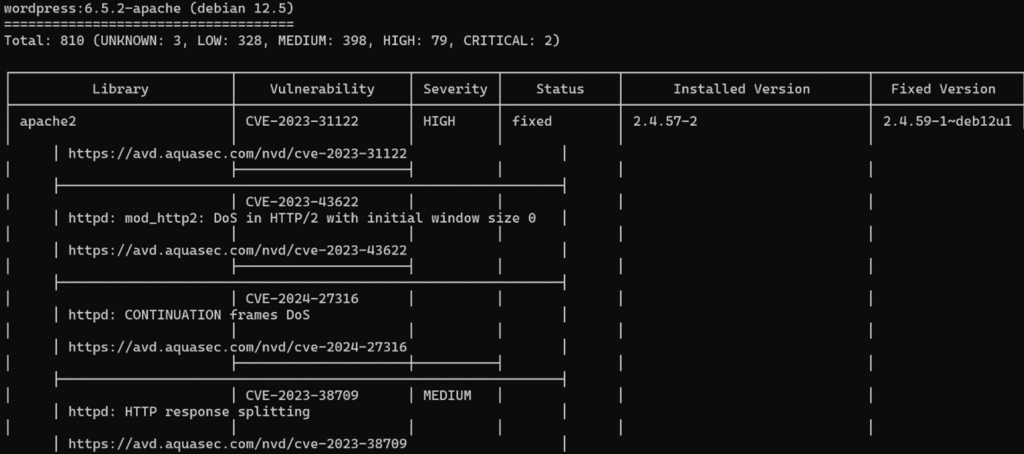
Trivy is installed and used via command lines.
For scanning images: trivy i [image name]
For scanning IaC configuration files: trivy config [IaC directory]
After the scan, the total number of vulnerabilities and their severity ranking are given.
As part of this comparison, we tested Trivy on Debian 12.5.0, scanning various images and Dockerfiles.
Who is it aimed at? All companies using containers and IaC.
Pros
- Ease of use. A single command line is all that’s needed and parameters can be added to filter by severity, for example.
- The scan is very quick to complete.
- Links to pages in the Aqua Security vulnerability database. It contains both CVE and misconfiguration pages.
Cons
- The absence of a graphical user interface, which may hold some users back.
- Lack of suggestions for remediation or vulnerability reduction.
5. OWASP ZAP for application security testing
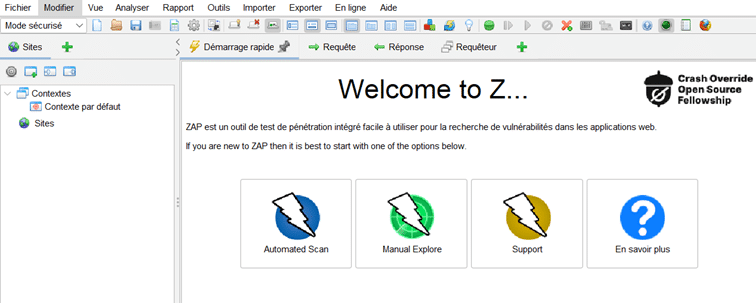
ZAP is a free, open-source tool for dynamic testing (DAST) of Web applications.
For the purposes of this comparison, we have tested ZAP for Windows with both automatic and manual scans.
Who is it aimed at? Companies wishing to check the security of the web applications they currently operate.
Pros
- Ease of use: it’s very simple to install and launch automatic scans.
- Customisable reports.
- Heads Up Display (HUD) functionality, which lets you perform scans and view alerts while interacting with the site to be tested in the browser.
Cons
- High learning curve. Even if it’s quick to get to grips with, there are plenty of functions and configurations to choose from. It takes time to read the documentation and carry out tests to optimize its use.
- The application interface is not very user-friendly.
Take Back Control of Your Cloud
6. Wazuh for XDR and SIEM
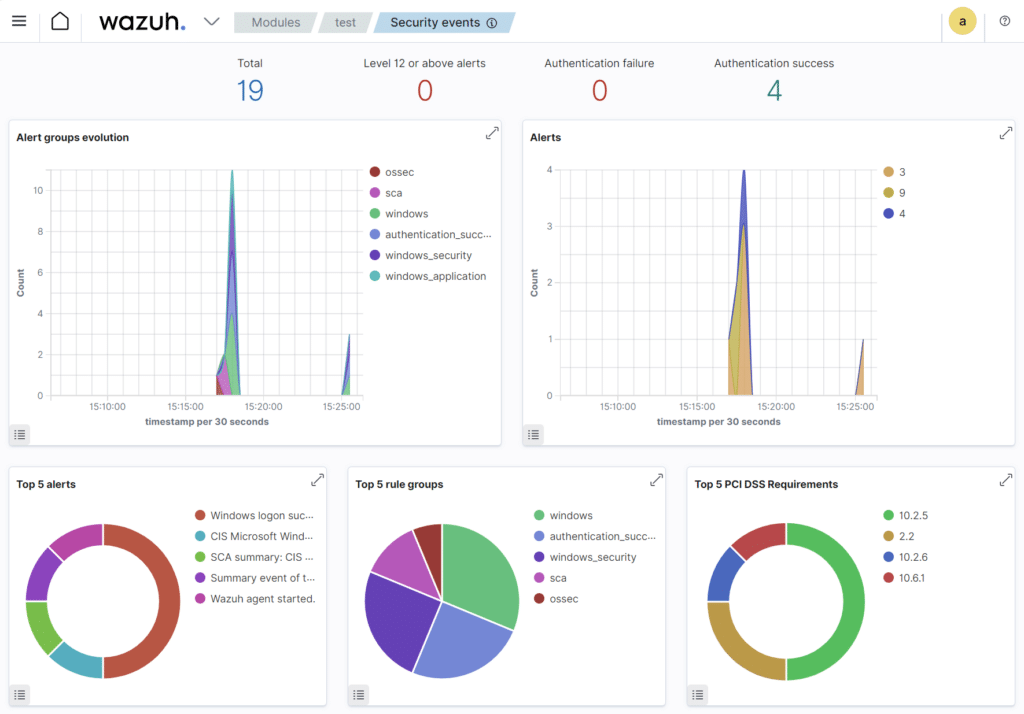
Wazuh is a SIEM and XDR platform. It’s open source and free, with a Cloud version available for a fee. For the purposes of this comparison, we installed the main components (Wazuh indexer, Wazuh server, Wazuh dashboard) on an Ubuntu 22.04.4 VM and a Wazuh agent on a Windows machine.
Who is it aimed at? Companies who want to start monitoring the security of their systems.
Pros
- The availability of agents for a wide range of systems (Linux, Windows MacOs, Solaris, AIX, HP-UX), allowing you to monitor a heterogeneous infrastructure.
- Easy to set up: both installation and operation are quick, requiring little effort.
Cons
- The Vulnerability Detector module is disabled by default.
- Some configurations cannot be carried out via the interface and require configuration files to be modified on the machine that is hosting the central components.
7. Splunk for security monitoring
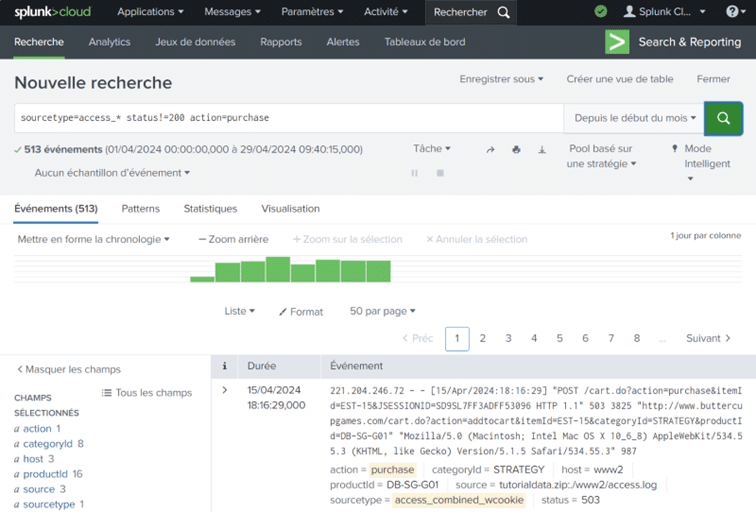
Splunk is a SIEM and SOAR platform. As part of this comparison, we tested Splunk Cloud.
Who is it aimed at? Companies with specific needs who are ready to make an investment in their security provision.
Pros
- Numerous possibilities for integrating other tools with Splunk, for example to supply it with data.
- Data standardisation. Moving from a log line to a table of fields/values improves understanding and processing.
- Research and data processing. You can isolate several hundred log lines and easily obtain statistics about them.
Cons
- Handling. Splunk does provide tutorials, but it takes time to understand and test the many features.
- The price. There are 4 pricing options: workload, ingest, entity, activity-based. It’s therefore important to carefully assess what you actually need before selecting the right category of pricing.
Open Source DevSecOps tools overview
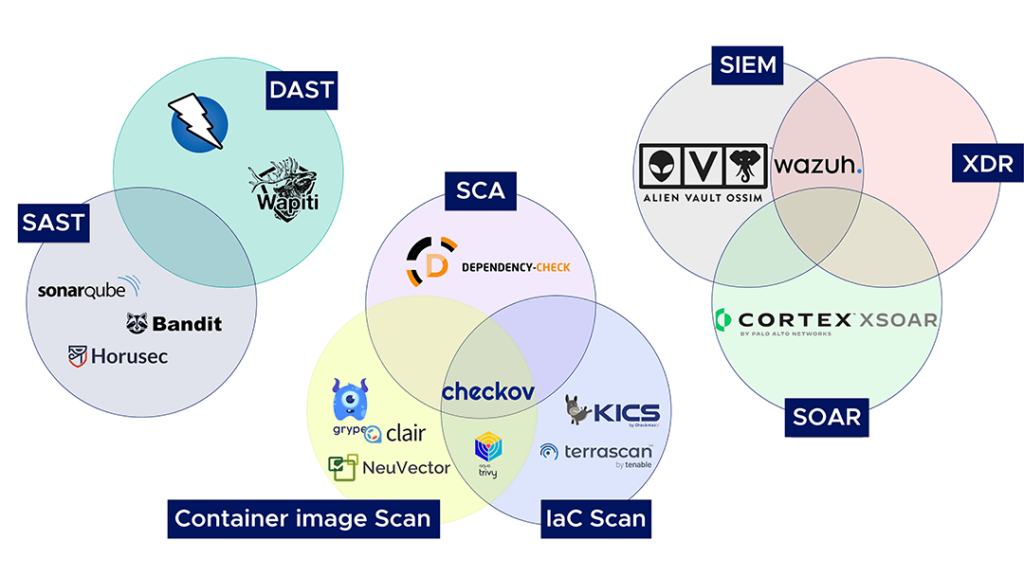
In the DevSecOps ecosystem, open source is a structural component of the market, since it is historically linked to DevOps and cloud-native. We therefore recommend a number of tools classified by category.
- SAST tools: SonarQube, Bandit, Horusec.
- DAST tools: OWASP ZAP, Wapiti.
- SCA tools: OWASP Dependency-Check.
- Container image scanning tools: Grype, Clair, NeuVector, Trivy.
- IaC scanning tools: Checkov, KICS, Terrascan, Trivy.
- SIEM tools: AlienVault OSSIM, Wazuh.
- XDR tools: Wazuh.
- SOAR tools: Cortex XSOAR.
💡Some tools appear in several categories, as they cover several uses.
How can Qim info help you implement DevSecOps tools?
Thanks to its in-house experience, Qim info’s Cloud & DevOps Solutions department can help you choose and implement DevSecOps tools.
- We can also provide consulting services if you’re new to DevSecOps or want to find out more about DevSecOps and its tools.
- Workshops can help you find the solution best suited to your needs.
- Depending on your activities, needs and constraints, Qim info can recommend tools to enhance the security of your projects.
- In addition to this activity, Qim info can also help you implement and configure DevSecOps tools.
In conclusion, there are many different types of tools available to facilitate the implementation of the DevSecOps approach.
The important thing is to choose tools that meet your objectives and are adapted to your work processes.
💡Our final tip: make sure you also give your teams time and training to fully adopt them.