

What is the cloud? ? Behind this widely used term lies a simple reality: your data and tools are no longer on your device, but are accessible online.
Qim Info explains the essentials so you can understand without getting lost in the jargon. In summary:
- The cloud allows you to store data and use software via the Internet.
- It replaces on-premises servers and infrastructure with remote services.
- There are several models (IaaS, PaaS, SaaS) depending on the desired level of management.
- It is used on a every day (emails, storage, work tools, apps).
- Its security depends both on the provider and on how you use it.
Definition of the Cloud
What does "Cloud" mean?
The Cloud (“nuage” in French) refers to a computing model that provides access to computing services (storage, servers, networking, software) via the Internet. The cloud is not physical but virtual; it corresponds to a network of servers located at a distance from one another, scattered all over the globe, but interconnected since they function as a single system.
So, as long as your data is stored in the cloud, you can access it anytime from any device connected to the Internet. The same goes for apps that use the cloud, such as Netflix or Deezer.

To put it simply, we can draw a parallel with water, gas, or electricity usage: you don’t own the infrastructure that manages them, but you still have access to them. It’s the same with the cloud: you use servers, applications, or storage space without owning the technical infrastructure.
Where does this term come from?
The term “Cloud” was first used in the early days of the Internet. More specifically, the term “cloud computing” emerged, referring to two related concepts:
- the data (“Cloud”),
- and the processing of this data (“computing”).
💡 It is, in fact, because cloud computing is often abbreviated to “the Cloud” that the concept is sometimes equated with and reduced to data storage, even though that is only the tip of the iceberg.
According to a survey by MIT Technology Review, the term “cloud computing” was first used in 1996. A group of employees was discussing how enterprise software would eventually migrate to the Web and suggested that cloud-compatible software would become the standard.
In 1997, American scholar Ramnath K. Chellapa used the term “Cloud Computing” and defined it as a “new computing paradigm” in which the boundaries of computing are determined by economic logic, rather than by technical limitations alone.
Many believe that the cloud in its modern form was introduced in 2006 by Eric Schmidt, then CEO of Google, during a conference in which he discussed “cloud computing” and “the cloud.”
The term was then used regularly the following year by Amazon, IBM, and Microsoft.
Ebook gratuit
A Brief History of the Cloud
- Late 1950s: American engineer and mathematician John McCarthy (1927–2011) developed the “time-sharing” technique, which allows multiple people to use the same computer at the same time. This is a fundamental concept of the Cloud, which is the pooling.
- The 1980s: The Internet made its debut before becoming widespread a decade later. Several companies began to outsource purely IT-related processes.
- 2000s: Amazon launches Amazon Web Services in 2002. The company invested in a massive IT infrastructure that was barely used the rest of the year to handle traffic spikes, then leased it to other companies before offering data storage and computing services.
- 2006: Google launches Google Docs, a service that, for the first time, makes the concept of cloud computing easily understandable to everyone.
- 2010s: Microsoft launches Azure. 2013 marked a major turning point with the arrival of Docker, which will make containers more accessible by simplifying their use.
💡And if you want to learn more about containerization, check out our dedicated article.
What are the uses of the cloud?
The cloud allows users to access IT services via the Internet without having to manage servers or infrastructure. Specifically, it is used to:
- store and back up data, which can be accessed at any time.
- Use online software that doesn’t require installation (email, office applications, CRM, etc.).
- Create and run applications without having to manage servers.
- Work remotely and collaborate easily, from any device.
- process and analyze data, including on a large scale.
👉 In practice, the cloud primarily helps save time, reduce technical management, and quickly adapt tools to meet your needs.
What technology does the cloud use?
Cloud computing is made possible by a technology called virtualization. A typical computer server consists of:
- a processor to perform the requested operations,
- a type of memory used to store information temporarily,
- a hard drive for long-term data storage.
The operating system is installed on top of this and acts as the conductor that runs applications. However, servers are very often underutilized, and there is frequently unused RAM or unused processing power.
That is why virtualization was invented, making it possible to run multiple operating systems at the same time on the same physical server. Each operating system runs in an isolated compartment, and each of these compartments is a virtual machine separately.
Virtualization requires a hypervisor; there are two types:
- Type 1, installed directly on the physical server;
- Type 2, installed on an operating system just like any other software.
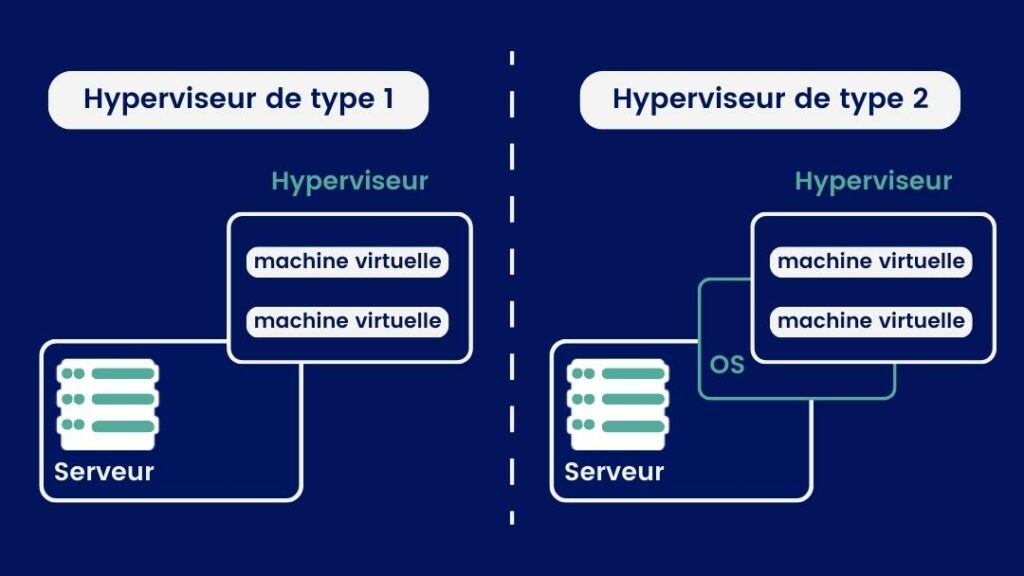
Consequently, cloud providers can offer access to their servers to a large number of customers at a moderate cost.
What are the different cloud hosting models?
The cloud comes in various hosting models, each of which will affect its key features.
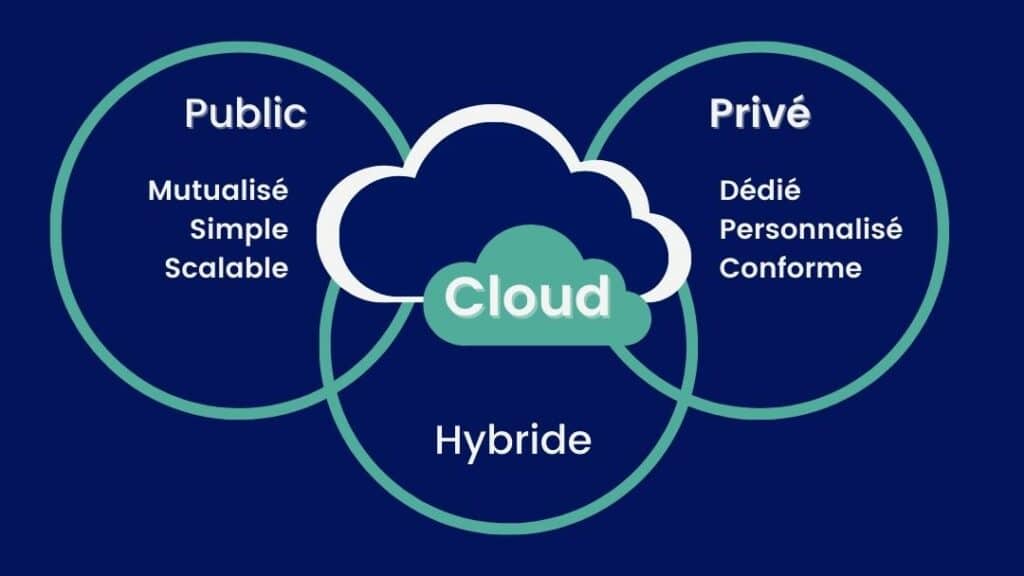
The Public Cloud
This is the most common cloud model, in which the technical infrastructure—including all hardware and software—is outsourced to the cloud provider. IT resources are therefore available to everyone and pooled—that is, shared with other organizations. You access the services and manage your account using a web browser.
The three best-known public cloud providers are Microsoft Azure, AWS (Amazon Web Services), and Google Cloud Platform.
Examples: Public cloud deployments are frequently used to provide email services, office applications, storage space, and online development and testing environments.
💡My advice: By 2026, the public cloud will no longer be just a technical choice—it will also be tied to broader issues such as vendor lock-in. Check out my article on the Sovereign Cloud.
The Private Cloud
A private cloud is a model in which all resources are reserved for the exclusive use of a single company and are therefore inaccessible to anyone outside the company. A private cloud can be physically located within your company or hosted by an external provider. Maintenance and infrastructure are dedicated exclusively to your company.
Private cloud providers include VMware vCloud, Microsoft Azure Stack, OpenStack, IBM Cloud Private, Oracle Private Cloud Appliance, and Dell Technologies Cloud, among others.
👉 Contrary to popular belief, a private cloud is not automatically more secure than a public cloud, because major public cloud providers invest heavily in security, often at a level that is difficult to achieve in-house. The private cloud primarily addresses the needs of control, compliance or data sovereignty. It is rarely used on its own, but rather in combination with the public cloud.
The Hybrid Cloud
As the name suggests, it is a hybrid of the private cloud and the public cloud that combines dedicated internal resources with external public resources to take advantage of the benefits of both.
⚠️It’s not just a matter of combining a private cloud and a public cloud! The challenge is to make them work together in a consistent manner, so that data or applications can be easily moved between the two.
Today, the hybrid cloud is primarily used for:
- keep certain sensitive data in a controlled environment,
- continue to use existing systems while taking advantage of the cloud,
- Choose where to deploy your applications based on cost, performance, or legal requirements.
It can help optimize costs, but it is also more complex to manage. Without a clear organizational structure, it can actually end up being more expensive.
👉 Key development in 2026: Today, hybrid cloud is often used to process certain data on-premises (for example, in a factory) and send the rest to the cloud.
Multi-Cloud
Multi-cloud refers to the use of multiple cloud providers (such as AWS, Microsoft Azure, or Google Cloud), whether exclusively in the public cloud or in combination with other environments.
In some cases, a multi-cloud environment is the result of a company’s history: an accumulation of service providers, mergers, or the gradual adoption of new services. But increasingly, it is a deliberate strategy designed to better meet specific needs.
In 2026, the main reasons for adopting a multi-cloud strategy are:
- avoid relying on a single supplier,
- choose the best services based on use cases (for example, AI from one provider, storage from another),
- improve business continuity by spreading risk.
👉 Note: Multi-cloud offers flexibility, but it also makes the whole system more complex to manage.
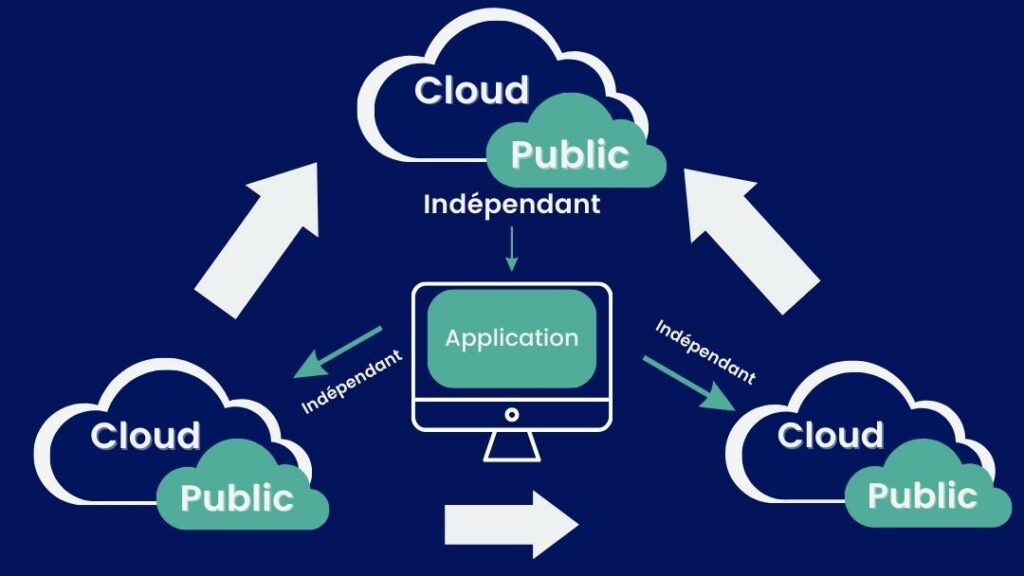
🔎 Hybrid cloud vs. multi-cloud: what’s the difference? These two concepts are often confused, but they are based on different principles. Hybrid = where your resources are hosted. Multi-cloud = which providers you work with. A company can use one, the other… or both at the same time.
Cloud Service Models
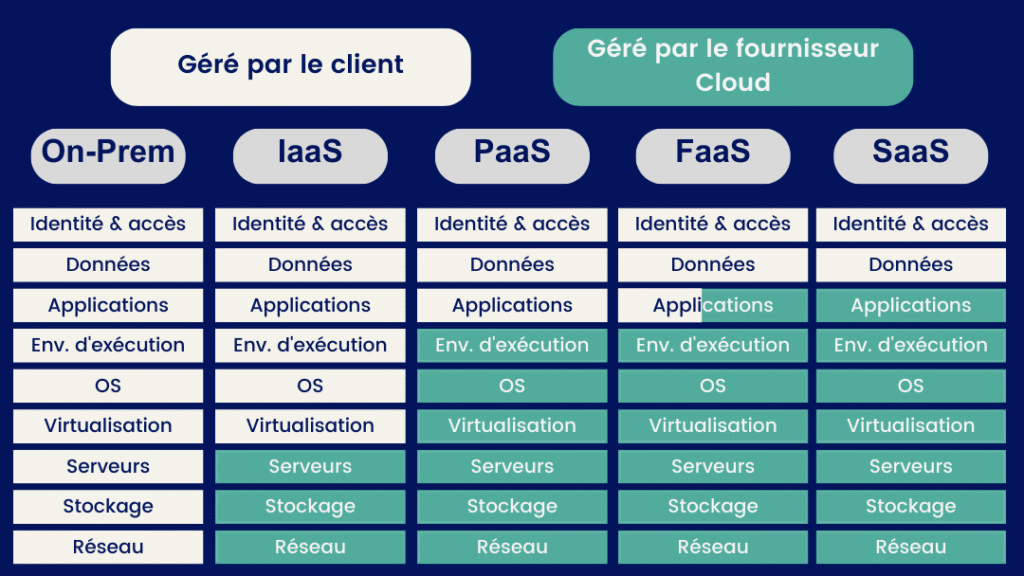
IaaS, PaaS et SaaS ne sont pas trois choix ! Ce sont trois niveaux de services qui peuvent coexister dans un même système d’information.
Exemple
Une entreprise peut utiliser :
- Microsoft 365 en SaaS pour la messagerie, les documents et la collaboration ;
- Azure App Service en PaaS pour héberger une application métier développée sur mesure ;
des machines virtuelles - Azure en IaaS pour faire fonctionner un ancien logiciel qui nécessite son propre serveur.
The Basics: IaaS, PaaS, SaaS
Infrastructure as a Service (IaaS)
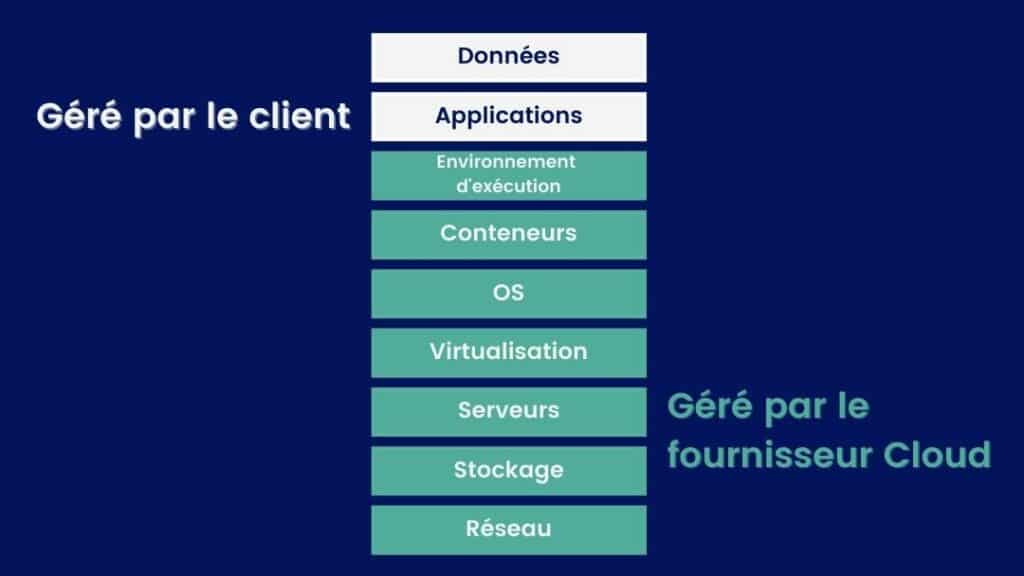
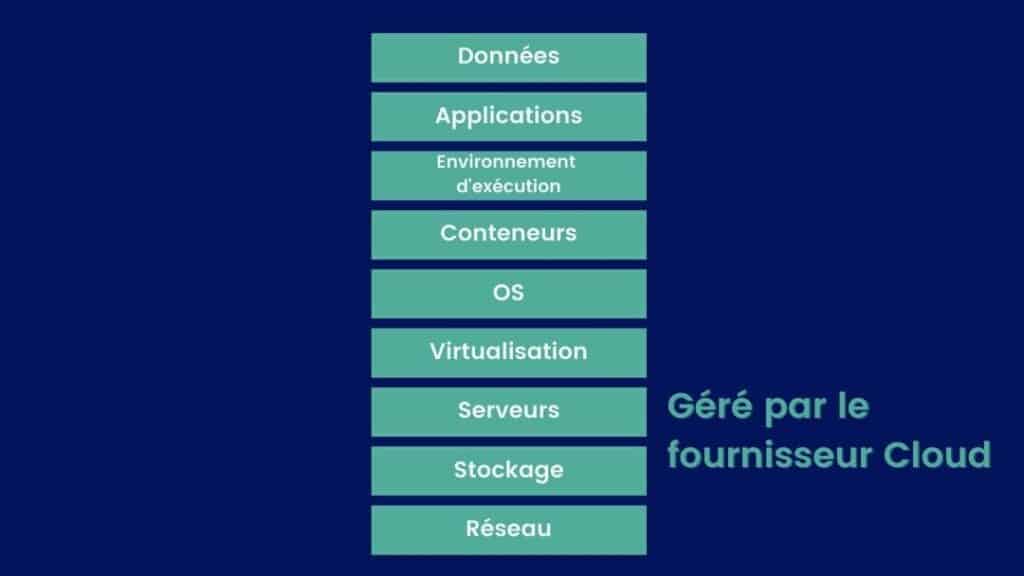
IaaS involves renting on-demand computing resources (servers, storage, networking) from a cloud provider.
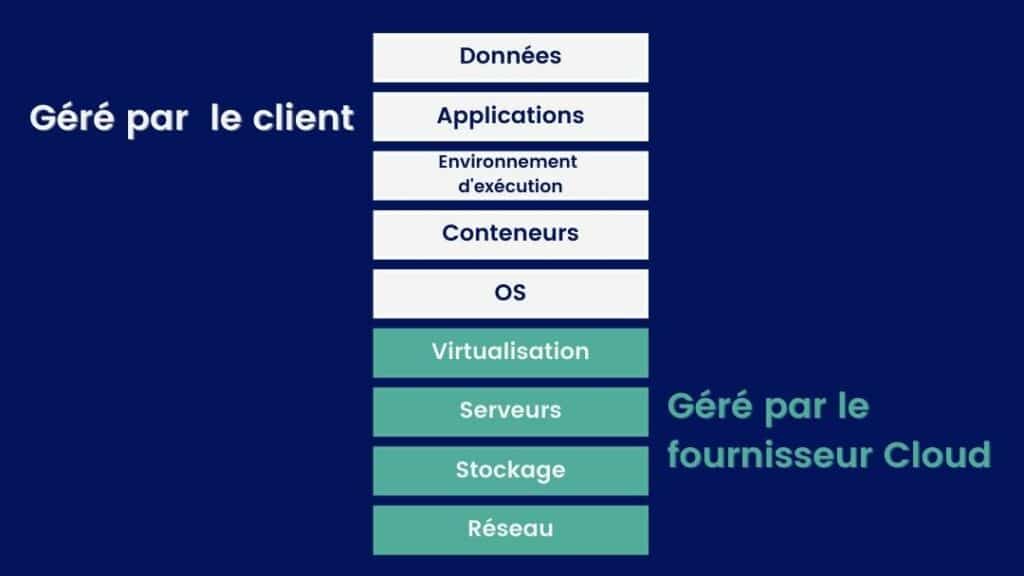
In this model, the provider manages the physical infrastructure, while the customer remains responsible for the operating system, updates, applications, and their configuration.
IaaS therefore offers a high degree of control, but also requires more day-to-day management.
It is still widely used, particularly for migrating existing systems to the cloud or for specific technical needs.
The leading IaaS providers are AWS, Microsoft Azure, Google Cloud, IBM Cloud, and Oracle Cloud.
Platform as a Service (PaaS)
The PaaS model allows you to develop and deploy applications without having to manage the infrastructure or the operating system. The cloud provider handles the platform (servers, OS, runtime environment), while the customer focuses on the code and applications.
This model simplifies developers’ work: there’s no need to set up or maintain servers—everything is already in place to create and launch an application.
PaaS offers less control than IaaS, but it is much easier to use on a day-to-day basis.
👉 Key takeaway for 2026: PaaS is often used to accelerate development, but it is increasingly being complemented by even more automated approaches, such as serverless computing.
Examples of PaaS platforms include Google App Engine, Heroku, AWS Elastic Beanstalk, Azure App Services, OpenShift, and SAP Cloud.
Software as a Service (SaaS)
SaaS allows users to access software directly online, without having to install or maintain it. The cloud provider handles everything: the application, updates, security, and infrastructure. For their part, customers simply use the service through a browser or an app.
This is the easiest model to use: no technical management is required.
👉 Key takeaway for 2026: SaaS has become the standard for most business applications (office software, CRM, HR, collaboration), with widespread adoption of online tools.
Examples: Microsoft 365, Google Workspace, Salesforce, Dropbox, and Slack.
The shift toward more automated models
The key phrase: less infrastructure, more automation.
Container as a Service (CaaS)
The CaaS model allows you to manage and deploy applications as containers without having to worry about the underlying infrastructure. The cloud provider offers a platform to run and organize these containers, while the customer manages its applications.
This model is primarily used by technical teams to deploy applications more flexibly and quickly.
👉 Key takeaway: CaaS is more technical than PaaS and is primarily used in modern architectures (microservices).
Example: Kubernetes, offered by AWS, Google Cloud, or Azure.
Function as a Service (FaaS)
With the FaaS model, the customer deploys code in response to events without creating or modifying the core code infrastructure.
This model applies to simple, repetitive tasks such as tool programming or request processing. Functions as a Service (FaaS) can also be very useful when you want to offload resource-intensive processing from software or scale your operations. Examples of FaaS providers include Azure Functions, AWS Lambda, and Google Cloud Functions.
Here is a summary of the business models of these five major services:
In addition to the main models, there are many specialized services available to meet specific needs:
- DaaS (Data as a Service): on-demand access to data.
- BaaS (Backend as a Service): ready-to-use services for applications.
- DaaS (Desktop as a Service): remotely accessible desktops.
👉 Most of these services are actually variations of SaaS or PaaS, tailored to specific uses.
What is the Cloud Act?
The Cloud Act is a set of laws that allows the the U.S. government to access the personal data of foreign citizens who use the services of U.S. companies such as Meta, Google, or Microsoft. The Cloud Act was enacted by Donald Trump in 2018 following a dispute between Microsoft and the U.S. government.
Who is really affected? The Cloud Act does not apply to countries. It applies to U.S. companies.
In practice: sIf your data is stored with a U.S. cloud provider, it may be accessible to U.S. authorities—even if the data center is located in Geneva or Zurich, and even if the provider is the European subsidiary of a U.S. company.
💡 My advice: Don’t panic. This isn’t automatic or uncontrolled access. Access to data under the Cloud Act requires a legal process. The Cloud Act provides for appeal mechanisms if a U.S. request conflicts with local laws such as the LPD.
For more information:
What are the benefits of using the cloud?
There are many benefits for a company that uses the cloud; we’ve summarized them below.
- Cost savings: With the subscription model, you pay only for what you use. Similarly, in some models, the lack of maintenance and a dedicated technical team helps you save money.
- Flexibility and scalability of services: If your needs change, you can easily increase or decrease your use of IT resources. Similarly, cloud-based managed services are updated regularly, allowing you to benefit directly from these updates without having to take any action.
- Time savings: Your company doesn’t have to worry about certain constraints, which are handled directly by the cloud provider. Public clouds, in particular, significantly reduce your responsibilities related to infrastructure management.
- Virtually unlimited storage capacity, as providers are constantly building new data centers.
- The ease of sharing data and applications.
- Data security: this is an issue that ultimately appears on both the list of the cloud’s advantages and its disadvantages. Admittedly, your data is transmitted to a third party, with all the implications that entails. Nevertheless, while the cloud is obviously not immune to hacking, it offers a higher level of security than a traditional system composed of physical machines.
What are the drawbacks of the cloud?
Despite its many undeniable advantages, cloud computing also has some drawbacks:
- Internet dependency: Cloud providers address this possibility for businesses and guarantee service levels that require them to maintain 95% uptime.
- Dependence on cloud providers: If your company relies on the services offered by a provider, you may find yourself at its mercy. You should also consider system interoperability, which may prevent you from switching providers.
- Migrating to and managing the cloud can sometimes be complex: a multi-cloud approach can make your IT system architecture more complex. Furthermore, migrating to a cloud infrastructure often presents complications, if only due to technical compatibility issues.
Are there risks involved in storing data in the cloud?
It is impossible to ensure complete data security, as is the case with any computer system. However, the cloud sometimes gets a bad rap, and this is unwarranted.
In reality, the confidentiality and protection of your data are a critical concern for cloud providers: they are implementing increasingly sophisticated strategies to provide assurances to end users. Cloud security is, in fact, a branch of cybersecurity.
Key point: Cloud security is based on a principle of shared responsibility :
- The provider secures the infrastructure (servers, network, data centers).
- The customer remains responsible for its use (access, configuration, data).
The majority of cloud security incidents stem from configuration or management errors on the customer’s end, not from a vulnerability on the provider’s end.
For Individuals
On the customer side, you can take the following steps:
- The Configuration : It’s important not to leave your cloud settings as they are, but to customize them to enhance security. When you buy a new computer or smartphone, you set it up according to your preferences; a cloud service should also be configured to optimize its security. Each provider offers its own tutorials on this topic, and you can delegate this task to a third-party service provider.
- Security : Use strong passwords, back up your data regularly, set up access permissions, keep your antivirus and anti-malware software up to date, and avoid public Wi-Fi.
- Read the terms of use carefully : Make sure the services offered and the types of coverage are appropriate for your business.
For Businesses
The Latest Studies Cloud Security Report from 2022 sponsored by (ISC)2 indicate that 93% of organizations are moderately or extremely concerned about cloud security.
That is why, for several years now, labels and certifications are flourishing in the world of cloud computing to offer businesses optimal security guarantees. Examples include:
- The international standard ISO 27001 specifies the requirements for information security management systems (ISMS).
- The international standard ISO 27017 provides guidelines for implementing information security controls for cloud services.
- In the United States, the CSA (Cloud Security Alliance) issues security certificates to providers that have several different levels of requirements.
Providers proudly display their compliance levels—for example, at AWS: Cloud Compliance – Amazon Web Services (AWS)
How much does it cost to use the cloud?
For Professionals
The cost of using the cloud varies depending on various factors, such as the cloud service provider, the types of cloud services used, resource consumption, and the duration of use.
In fact, providers offer various pricing models, such as pay-as-you-go or monthly flat rates. Cloud services include, among other things, storage, computing power, databases, and messaging services, and each service may have its own pricing.
The cost depends on the amount of resources consumed, such as storage space or bandwidth used. Some providers offer different service tiers with additional features, which may result in additional costs.
In addition to resource usage, there may be other fees associated with specific features. To estimate costs, we recommend visiting the providers’ websites and using their online cost calculators.
For Individuals
If we look at data storage services, paid plans offering a one-year commitment and 2 TB of storage from pCloud, kDrive, Google Drive, Dropbox, and NordLocker range from 5 to 10 CHF per month. Each plan on its own is inexpensive, but it’s the accumulation of multiple plans that ends up adding up to a larger expense.
How do you choose a reliable cloud system?
Which cloud service is the most reliable? It’s undoubtedly the one that best meets your needs in terms of services offered, pricing, and security. Let’s review the various criteria to consider when choosing a cloud system for your business.
Services Offered
Most of the services used in public clouds are also available in private and hybrid clouds. However, public clouds offer niche services that do not yet have ready-to-use equivalents in private clouds.
Rates
Public cloud services are usually billed based on actual usage. Therefore, they do not require an upfront investment. Private and hybrid clouds, on the other hand, require a private hosting infrastructure, which means the company must make an investment. In return, long-term operation is less expensive.
Compliance, Regulation, and Safety
Private clouds are often the preferred choice in this area. However, in the absence of strict sovereignty requirements or standards, public clouds are becoming increasingly compliant with various regulations. Furthermore, most recent regulatory frameworks, including the GDPR, were drafted with the cloud in mind.
Performance
The real bottleneck for public clouds in terms of performance is the bandwidth of your Internet connection. Some operations will be slower when run in a public cloud and faster in a private cloud.
Ease of administration
A public cloud requires less administrative effort, since the service provider does more than just provide IT resources. In the case of a private or hybrid cloud that relies on the infrastructure of your own data center, you are responsible for maintaining that hardware.
Compatibility
In a public cloud, it can be difficult to migrate from one cloud platform to another. In a private cloud built using a platform such as Kubernetes, it is possible to migrate to a different infrastructure, provided that you continue to use the same hosting platform after the migration. The hybrid cloud is certainly the most complex scenario, as these solutions are specifically designed to promote the widespread use of proprietary technologies.
Location
The location of a cloud system is important because it can affect latency, regulatory compliance, and data availability; therefore, it is crucial to choose a location that meets your specific needs in terms of performance, security, and compliance.
Our experts have a variety of cloud consulting services to offer you to help you make an informed decision.
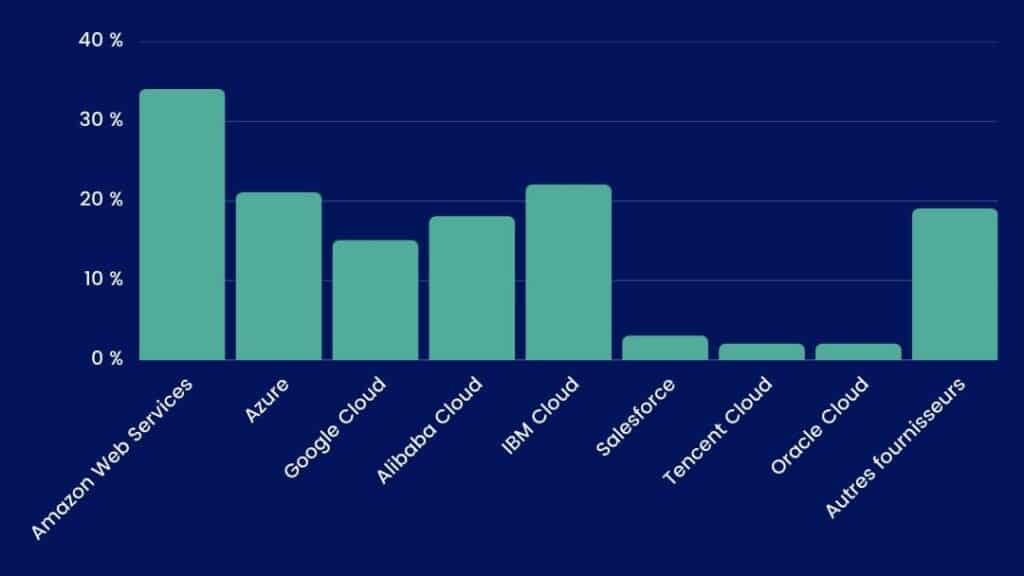
Top Cloud Services by Market Share
According to a study by Synergy Research Group the giants dominating the cloud are Amazon, Microsoft, and Google.
Cloud Technologies We Recommend
In reality, no single cloud solution is better than another: a particular cloud solution might be perfect for Company A but completely useless for Company B. One organization may require stringent security standards, while another may not consider this a key selection criterion.
By starting with your needs, we can determine which technologies will be most useful to you—and that is precisely where our Qim info Center of Expertise comes in, with its cutting-edge expertise and comprehensive understanding of all the options available to you.
Our experts carefully analyze your needs to make the right decisions, focusing in particular on the following questions:
- Public or private cloud?
- How many Clouds should I use?
- A PaaS model, or perhaps SaaS—or is it actually IaaS?
- Should the cloud be European or Swiss, or is working with the major U.S. cloud providers a viable option?
How long does it take to migrate to the cloud?
For a company, a successful migration is carefully prepared in advance and requires time for planning, consideration, and adjustments. That is why Qim info has developed cloud migration solutions that are fully tailored to your needs. A migration takes place in several stages:
- Assess your company’s needs: list the programs, estimate the costs, and determine the human and financial resources required;
- Selecting an external service provider to manage the migration: unless you have experts within your company, it’s a good idea to seek assistance with this transition;
- Choosing the type of cloud that’s right for you;
- Selection of one or more cloud providers;
- Architectural Design: the landing zone;
- Integration with your current information system and testing;
- Data and Application Migration;
- Performance monitoring and setting up alerts;
- Communicating about the transition to your teams: Adopting the cloud can significantly change the way your teams work. Therefore, it is essential to gain their buy-in.
💡Check outthis case study: Taking over an AWS cloud migration project for an international financial institution.
Ebook gratuit
FAQ
What exactly is the cloud?
The cloud refers to servers accessible via the Internet that allow users to store data or use software without installing it on their computers.
In practical terms, instead of storing everything on a single device, information and services are hosted remotely and can be accessed at any time.
Where is my cloud storage located?
Your data is stored in data centers, which are secure physical facilities managed by cloud providers.
These servers may be located in different countries, depending on the service used and the options selected.
Is the cloud free?
Some cloud services are free, such as Google Drive or Dropbox, but they have limits on storage space or features. Once you exceed those limits, you have to pay to get more space or additional options.
👉 In practice, cloud services often operate on a “free + pay-as-you-go” model.
What are the benefits of using the cloud?
The cloud lets you access your data and tools from anywhere, without being tied to a single device.
It also simplifies management: there’s no need to install, update, or back up anything yourself—it’s all done automatically.
👉 In practice, it saves time and makes it easier to work, whether alone or as part of a team.
In conclusion, it is clear that the cloud is now an integral part of our lives, whether in our daily lives or at work. The challenge is not so much adopting the cloud as it is making the right choices: which service is best suited for a given need, and which configuration will offer the best performance at the lowest cost.
At Qim info, we fully understand this, which is why we created our Cloud & DevOps Solutions department to offer our clients services tailored to these challenges.
We hope this guide has helped clarify things for you. We’re available to discuss your needs.

Clément Raussin
Head of the Cloud & DevOps Solutions Department at Qim info